
Introduction

The PELADN H05 features AMD's Ryzen AI 9 HX 370, a 12-core, 24-thread processor paired with Radeon 890M integrated graphics, putting it in a different class than its W04 counterpart. This is one of PELADN's higher-performance Mini-PCs, targeting users who want solid CPU power and modern iGPU performance in a compact desktop. Its specifications place the H05 alongside systems like the impressive GEEKOM A9 Max, which sets expectations for strong productivity performance and much better graphics capability than most iGPU-only Mini-PCs.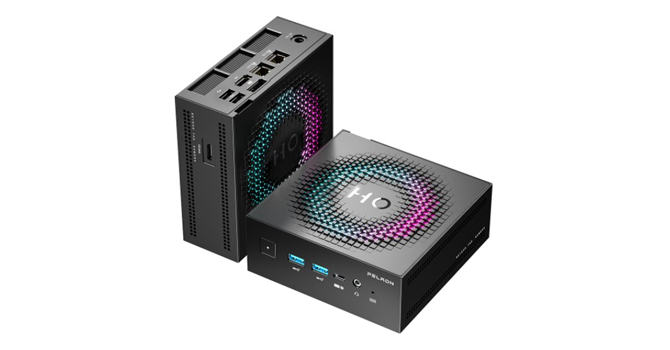
The Radeon 890M runs up to 2.9 GHz and is currently one of AMD's strongest iGPUs in the mid-range market, giving this system real potential as a viable option for some AAA gaming. Paired with LPDDR5X-7500 memory, the platform delivers the bandwidth needed for modern games, content creation, and GPU-accelerated tasks. Compared directly with the GEEKOM A9 Max, which currently leads our charts, the H05 finally brings hardware that can match it in CPU-heavy workloads and close the gap, or even pull ahead, in iGPU-focused scenarios. As you will see throughout this review, this may end up being the best mid-range iGPU gaming Mini-PC we have tested to date.
For connectivity, it includes dual 2.5 GbE LAN, Wi-Fi 7 with Bluetooth 5.4, USB4, HDMI, and DisplayPort. There's also an OCuLink port, which is still rare on Mini-PCs and a big deal for anyone interested in leveraging external GPUs for their rig. Unlike Thunderbolt or USB-based eGPU solutions, OCuLink provides a direct PCIe connection, which means higher bandwidth, lower latency and far better performance with a discrete graphics card. That gives the H05 huge upgrade potential, especially for gaming or GPU-heavy workloads. Storage features two PCIe 4.0 M.2 slots, while memory is soldered LPDDR5X, so RAM upgrades are not possible.
Hovering just below the $1K price tag, this review configuration shipped with 32 GB of LPDDR5X-7500 memory and PCIe 4.0 storage, along with Windows 11 Pro preinstalled.
| Specifications | |
|---|---|
| CPU | AMD Ryzen AI 9 HX 370 12 cores/24 threads TSMC 4 nm process Up to 5.1 GHz 54 W TDP |
| GPU | AMD Radeon 890M Up to 2.9 GHz |
| Memory | Onboard LPDDR5X-7500 Up to 32 GB (soldered, not upgradeable) |
| Storage | 2× M.2 NVMe SSD slots PCIe 4.0 x4 (no SATA support) |
| Display Outputs | 1× HDMI 2.0 (4K @ 60 Hz) 1× DisplayPort 1.2 (4K @ 60 Hz) USB4 Type-C (video supported) |
| I/O Ports | 1× USB4 Type-C (20 Gbps, supports USB-C PD power input (according to the manufacturer)) 2× USB 3.2 Gen 2 Type-A 2× USB 2.0 Type-A 1× HDMI 2.0 1× DisplayPort 1.2 2× 2.5 GbE LAN 1× OCuLink (PCIe 3.0 x4) 3.5 mm audio jack DC-in |
| Networking | Wi-Fi 7 Bluetooth 5.4 Dual 2.5 GbE Ethernet |
| Operating System | Windows 11 Pro |
| Power Adapter | 19 V/6.3 A (120 W) |
| Dimensions | 130 × 130 × 55 mm |
| Weight | 1,000 g (bare unit) |
| Included Accessories | Power adapter HDMI cable VESA mount User manual |
| Price | Around $920 USD (at the time of this review) |
Packaging and Contents


The PELADN H05 ships in a compact black box with some branding, but keeps things mostly simple. It's nothing fancy, but inside, the system is secured with a simple molded insert that holds it in place. Very basic, but it's all you need, really.

Included accessories include a 120 W power adapter, AC power cable, HDMI cable, VESA mount with screws, and basic documentation.
Design and Build

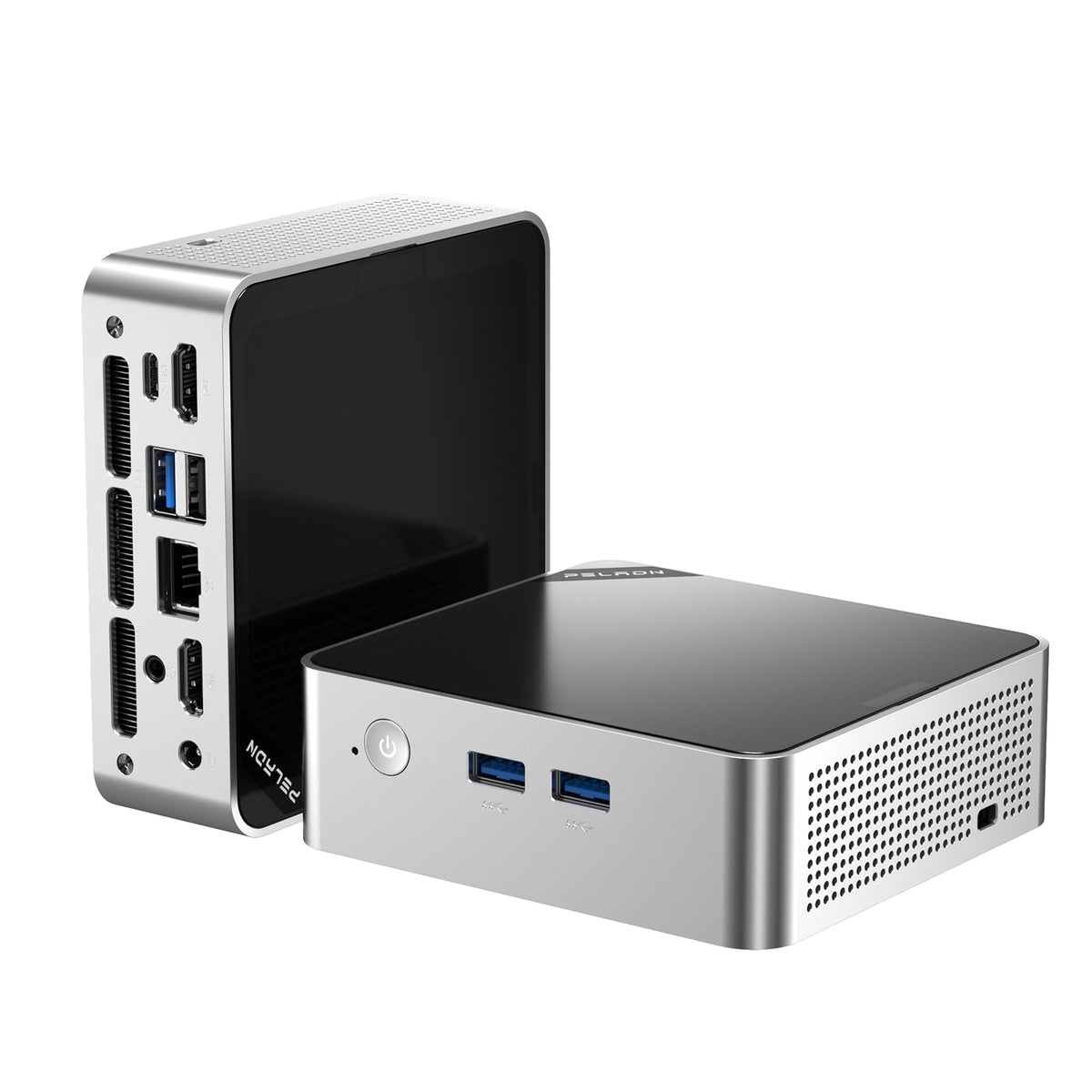
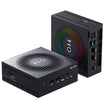
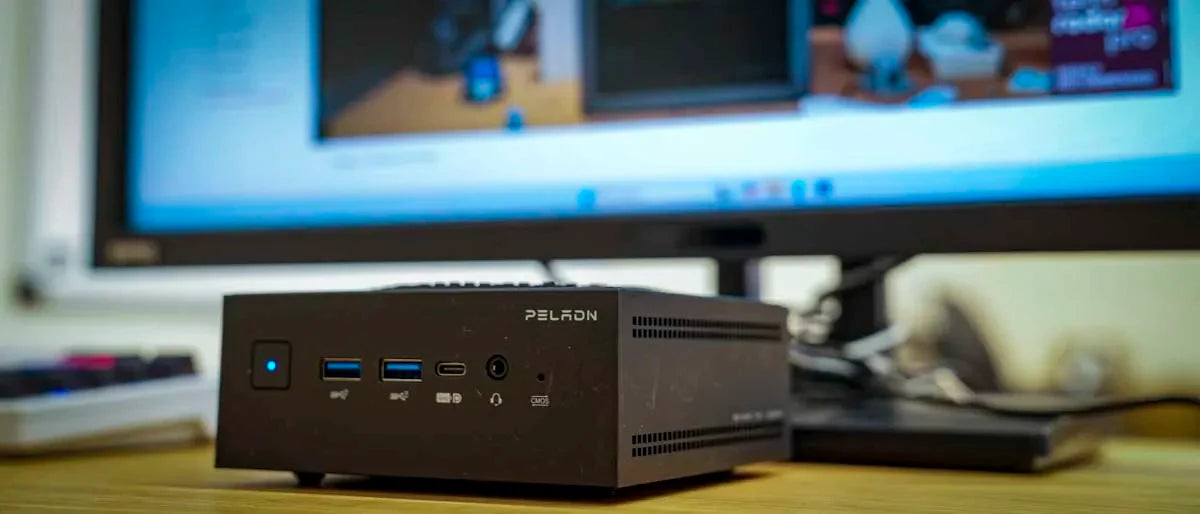
The H05 uses a compact, all-black plastic enclosure that felt pretty solid when I was handling it. The front panel layout keeps frequently used connections easy to reach, including the power button, a 3.5 mm audio jack, two USB 3.2 Gen 2 Type-A ports (which are spaced far enough apart to avoid crowding wider plugs) and a front-facing USB-C port, which works well for fast external storage, quick accessories, or connecting a portable monitor without having to reach around the back of the system.


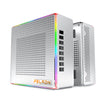
One of the more distinctive design elements on the H05 is its integrated LED lighting. A textured light ring runs around the top of the chassis, forming a stylized outline around the "H05" branding, and it gives the system more visual presence than the typical Mini-PC you see on a desk.
The lighting can be adjusted by gently pressing the center of the top panel, cycling through several modes. These include a static glow, a slow circular motion, and multicolor effects, including a rainbow option. For users who prefer a cleaner look, the lighting can also be turned off entirely, allowing the system to blend in more easily with a work-focused setup. It has no impact on performance, but it does add a bit of visual personality that you do not often see in this category.


Around the rear, the H05 houses most of its connectivity, including a HDMI 2.0 port, a DisplayPort, dual 2.5 GbE Ethernet ports, two USB 2.0 Type-A ports for peripherals, and the DC power input. Venting along the rear and side panels provides a path for warm air to exit the enclosure.
A Look Inside


While there are reasons for its design, accessing the H05's internals quickly becomes the least enjoyable part of using the system. After removing the four exterior screws, you'll see a dedicated fan assembly sitting directly on top of the motherboard and CPU.

To reach the SSD, the motherboard itself needs to come out, so nothing user-upgradable is within reach after the first step. That means removing four additional screws located at each corner of the board and then carefully lifting it out of the enclosure. The wireless antenna is routed from the motherboard to the chassis, so the board cannot be fully removed without dealing with that connection. You need to keep the board partially suspended while making sure the antenna cable is not pulled loose from its connector (until you can extend the antenna wire), which is small and easy to stress if you are not paying close attention. We have seen this same setup in other Mini-PCs before, and it tends to turn a simple storage upgrade into a slow, careful process.
There is also the power button to contend with. Once the motherboard is removed, the power button is no longer held in place by anything and can fall out of the front panel (which it did several times, even when I was being careful). When reinstalling the board, the button has to be positioned correctly so it lines up with the switch on the motherboard and the opening in the enclosure at the same time. It works fine, but it can take some patience, and it is easy to fumble if you are not expecting it.
That said, manufacturers often use this kind of layout to save space and improve airflow in very compact designs. By mounting the fan directly over the CPU and keeping the board tightly integrated with the chassis, they can maintain better cooling and keep the system smaller overall. The trade-off is serviceability. This approach favors thermals and compactness over ease of access, which makes sense from a design standpoint, but it does mean upgrades are more annoying than on systems that place storage directly on the underside panel.
The upside is that the H05 ships with a Crucial P3 SSD, which is a welcome change from the generic OEM drives often found in Mini-PCs. Performance is more predictable, and it avoids the slower behavior that usually shows up with no-name storage.
Once everything is reassembled, the system feels solid again, but reaching that point takes more time and attention than most people would expect for a simple SSD swap. In reality, this may not be a frequent issue since storage upgrades are typically a one-time task, and many users will never open the system again unless the drive needs replacing or additional capacity becomes necessary.
General Performance
AIDA64 Cache and Memory
First up in our performance analysis is AIDA64's memory benchmark. This test gives a clear picture of how quickly the CPU and memory subsystem can move data. Since the Radeon iGPU relies on system RAM, bandwidth and latency play a direct role in both everyday performance and graphics performance.
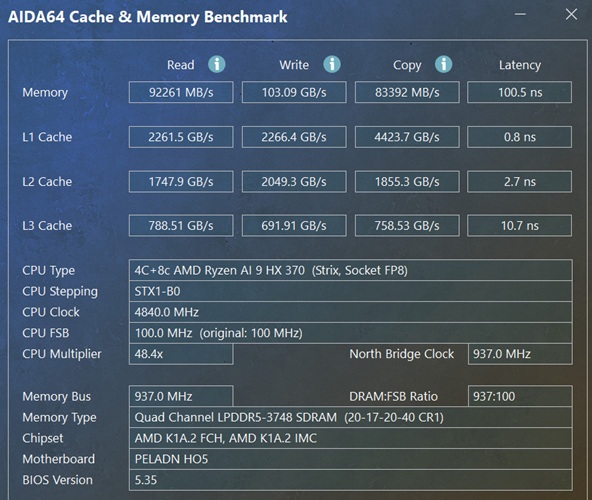
On the PELADN H05, memory read reaches 92,261 MB/s, write jumps to 103.09 GB/s, and copy comes in at 83,392 MB/s, with latency measured at 100.5 ns. That is a major step up from DDR5-4800 class systems. The higher write bandwidth in particular gives the integrated Radeon 890M more headroom, which shows up later in graphics-heavy tests.
Cache performance is equally strong, with L1 pushing over 2.2 TB/s for both read and write, L2 sitting around the 1.7 to 2.0 TB/s range, and L3 hovering near 790 GB/s. These cache speeds help reduce memory stalls during heavier workloads and keep things moving smoothly when switching between apps or handling mixed CPU and GPU tasks. Overall, the H05's memory subsystem plays a big role in why this Ryzen AI 9 HX 370 platform performs so well across both compute and graphics workloads.
Cinebench
Cinebench measures how well the CPU handles both single-threaded and multithreaded rendering. It is a simple way to compare real compute performance across systems.
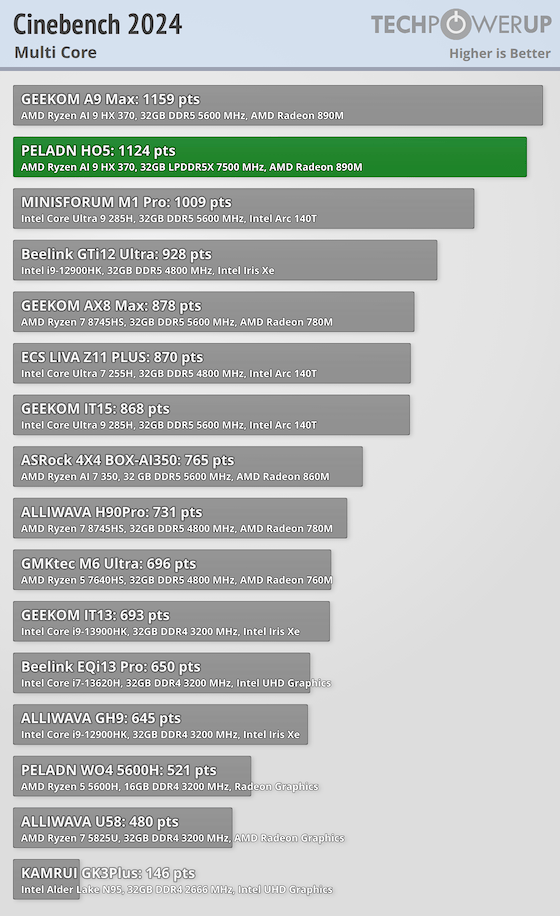
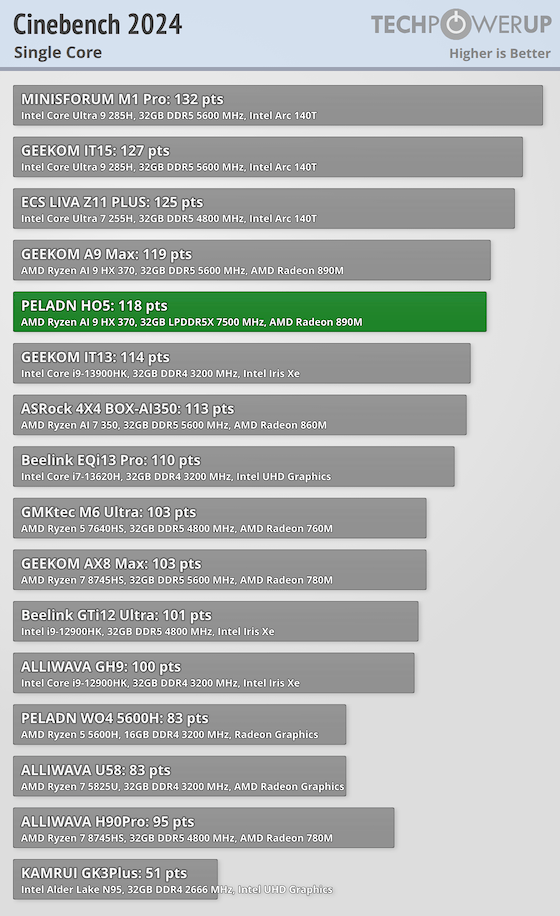
The H05 scores 1,124 in Cinebench 2024 multicore, putting it right alongside other Ryzen AI 9 HX 370 systems and well ahead of Ryzen 7 and Ryzen 5 Mini-PCs. For CPU-heavy work such as compiling, rendering, or large exports, the H05 will perform very well.
7-Zip
7-Zip's internal benchmark stresses compression and decompression, which shows how the CPU handles file-heavy tasks like installs, archiving, and packaging.
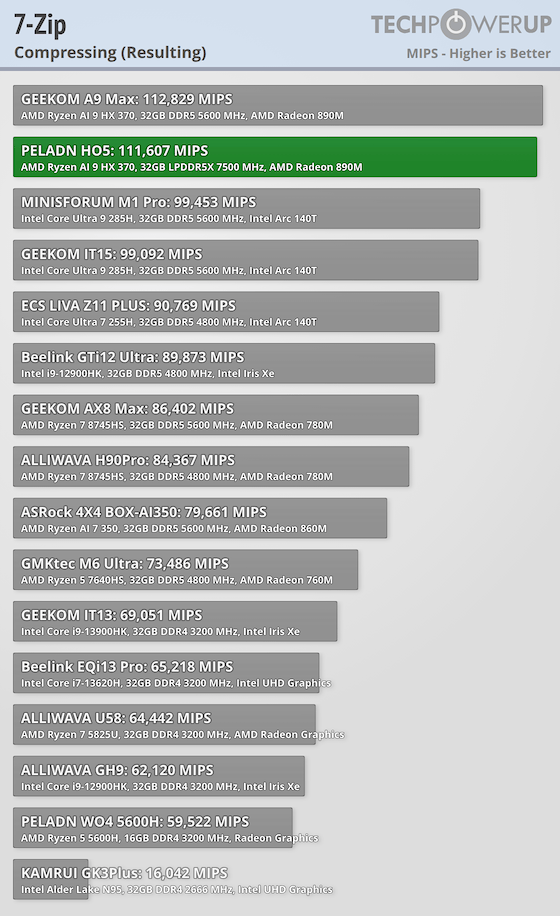
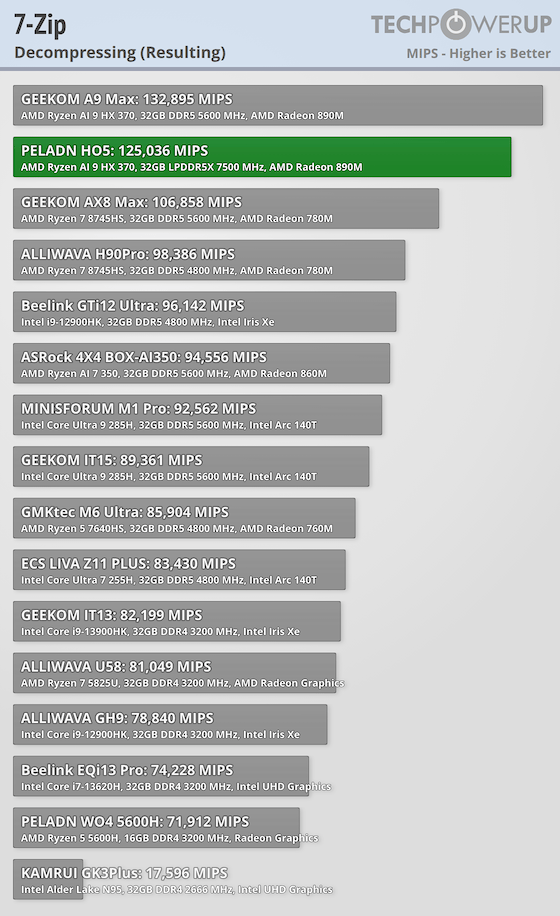
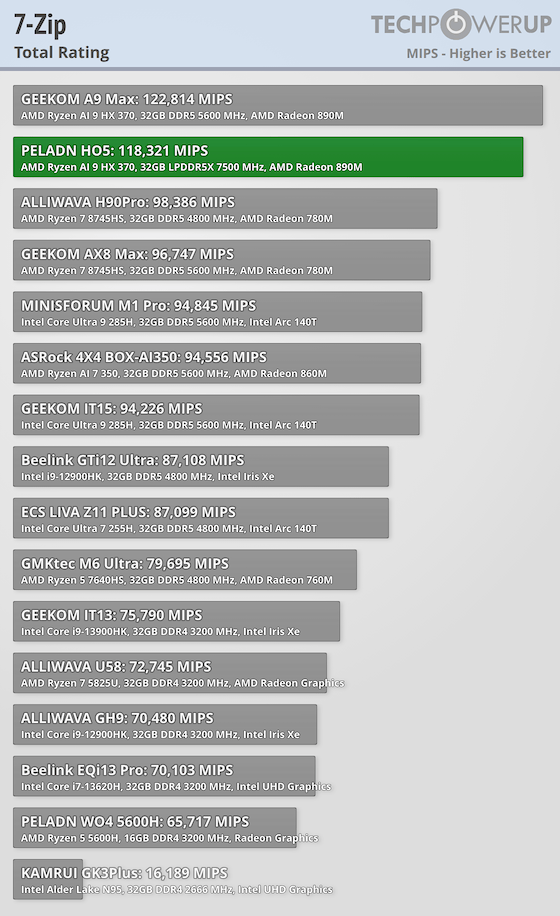
Here, the H05 posts 111,607 MIPS in compression and 125,036 MIPS in decompression, resulting in a total score of 118,321. Both numbers are well ahead of typical Ryzen 5 Mini-PCs and show strong performance for file-heavy tasks.
PCMark 10
PCMark measures day-to-day responsiveness across web, conferencing, documents, multitasking, and light content creation.
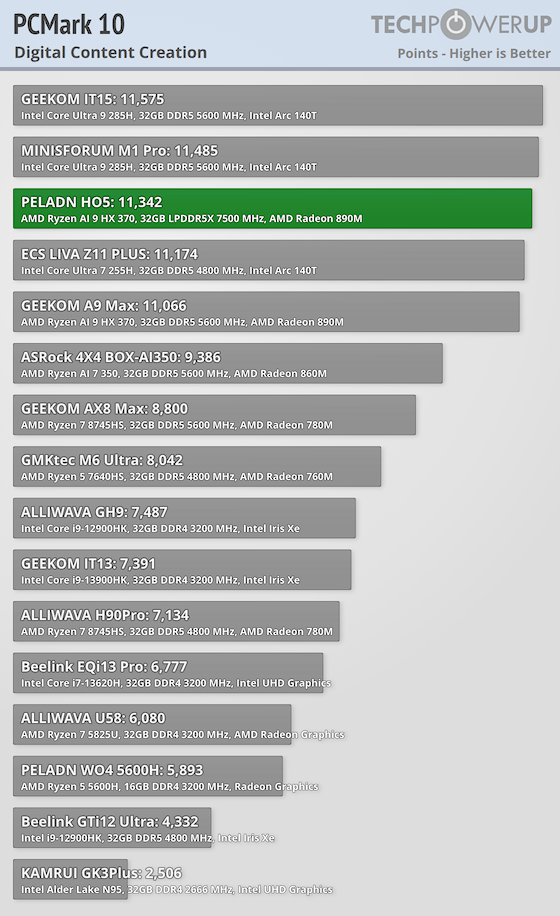
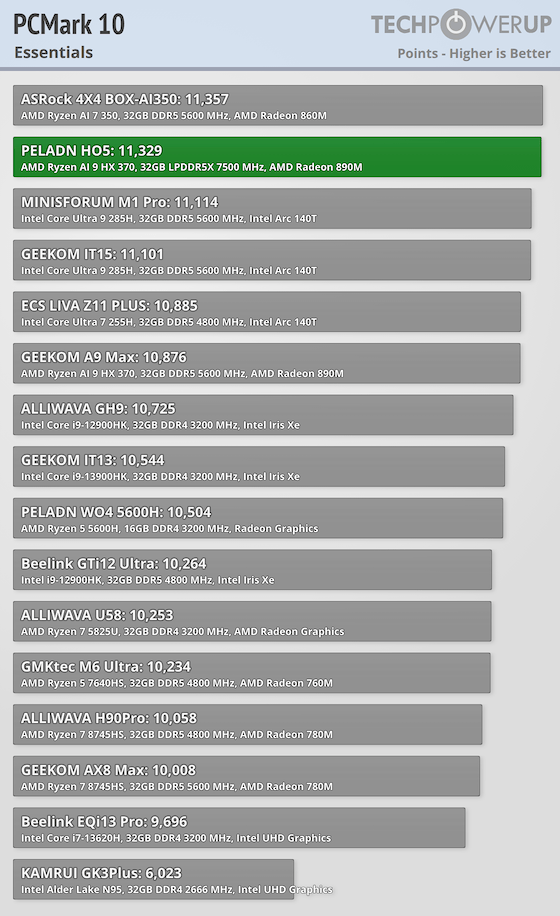
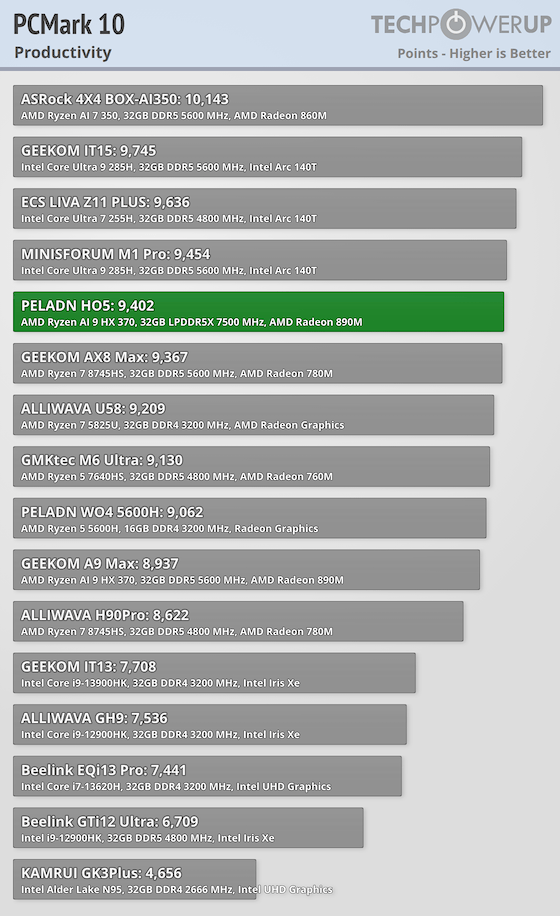
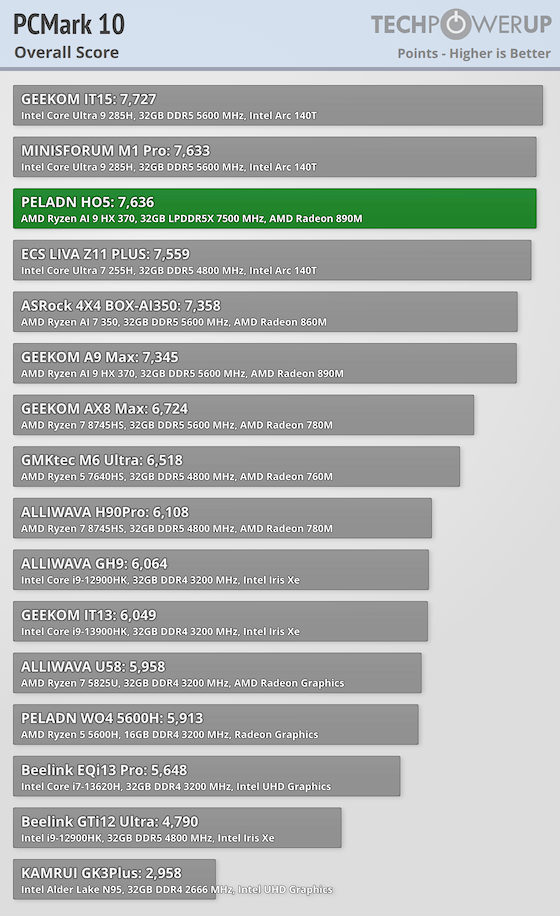
The H05 posts great results in Essentials and Productivity, showing us how fast the system feels during real desktop use. Opening apps, moving between workloads, and handling heavier multitasking all benefit from the extra cores and memory bandwidth.
Y-Cruncher
Y-Cruncher stresses the CPU with an extremely heavy math workload, making it a good stress test for stability and raw compute.
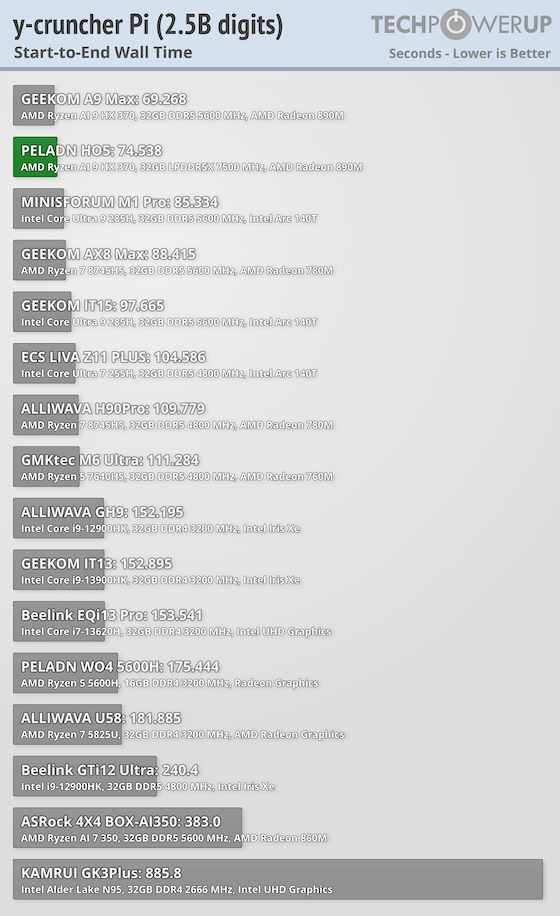
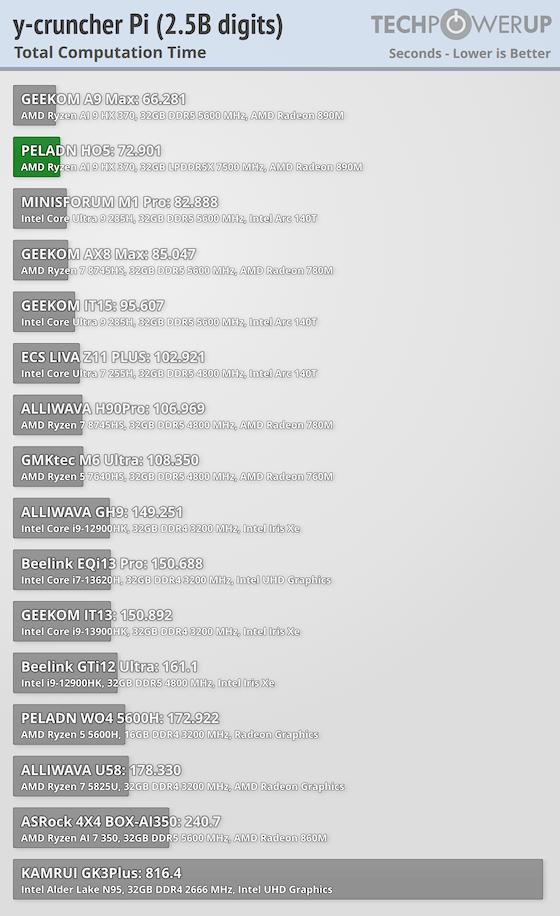
The H05 completes the 2.5B Pi calculation in 72.901 seconds, with a wall time of 74.538 seconds. That puts it well ahead of most compact Ryzen systems and closer to what you would expect from larger desktops.
Geekbench
Geekbench covers a wide range of real workloads and gives a balanced look at CPU strength.
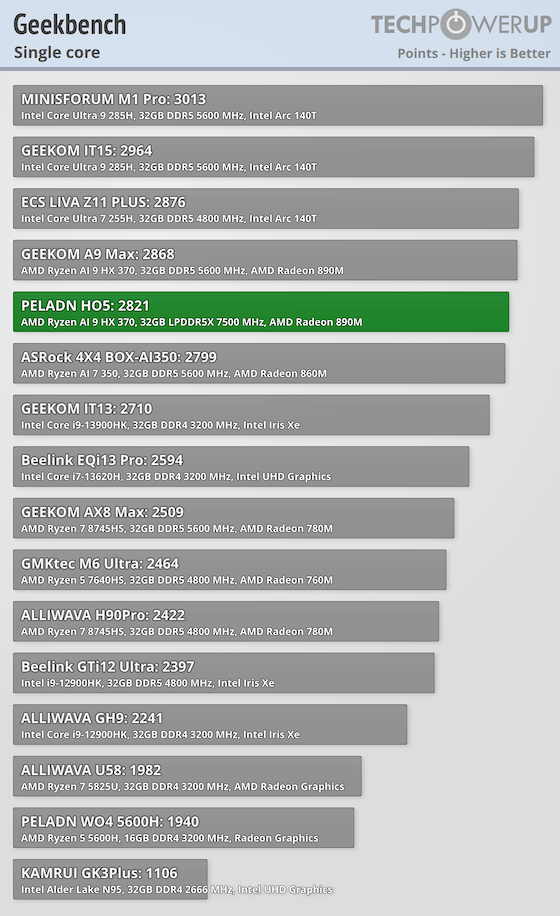
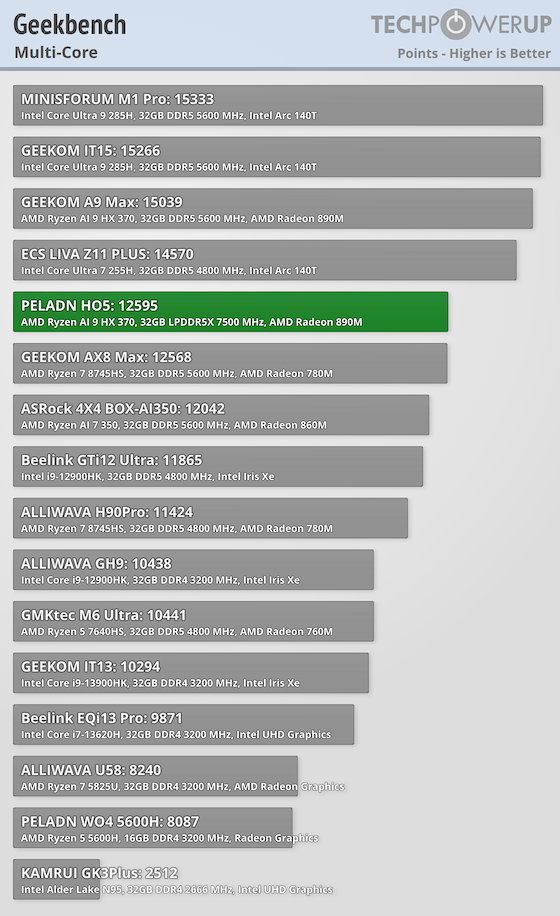
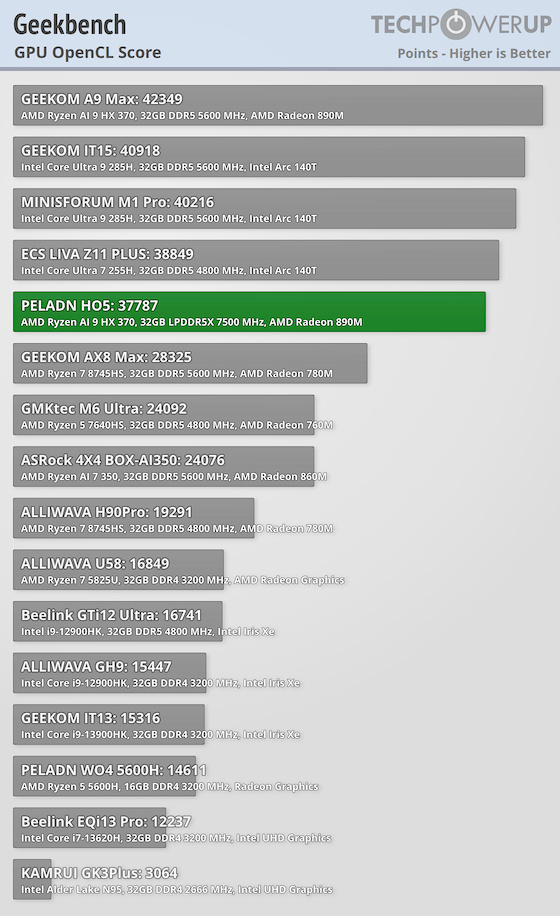
On the PELADN H05, Geekbench comes in with solid results including 2,821 single-core and 12,595 multicore. For GPU compute, it hits 37,787 in OpenCL.
Web Browsing
The Speedometer benchmark measures how fast a browser can handle dynamic web apps. It simulates everyday interactions like to-do lists, shopping carts, and navigation to reflect real-world performance. I ran Speedometer three times in the latest version of Chrome and used the average score.
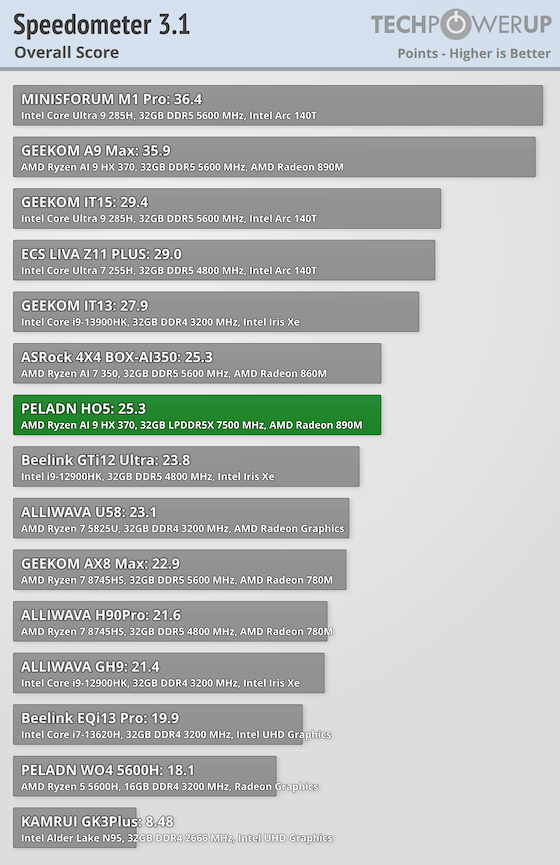
The H05 scores 25.3 in Speedometer 3.1, which means you'll have very smooth browsing, fast page loads, and quick UI interactions for more complex pages.
Microsoft Office
The UL Procyon Office suite runs real Microsoft Word, Excel, PowerPoint, and Outlook workloads. It provides a clear sense of how well a system handles day-to-day productivity apps.
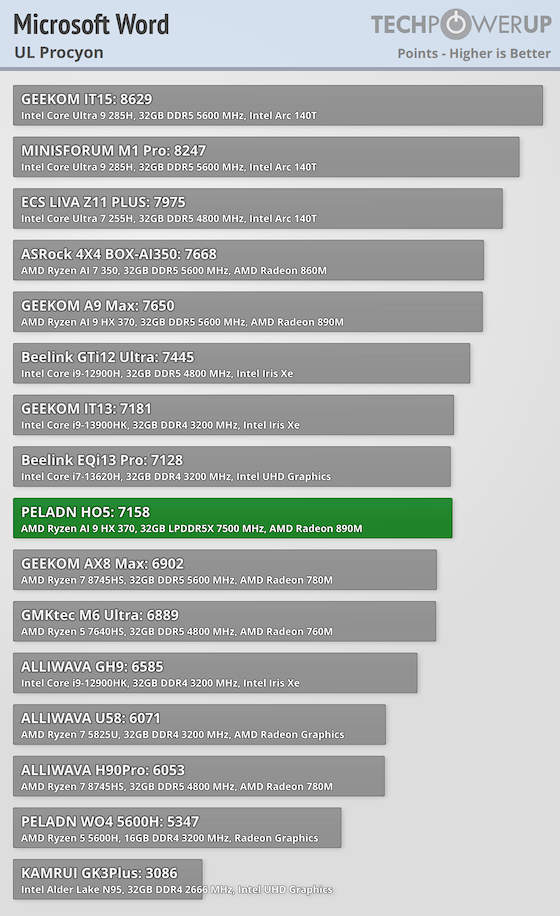
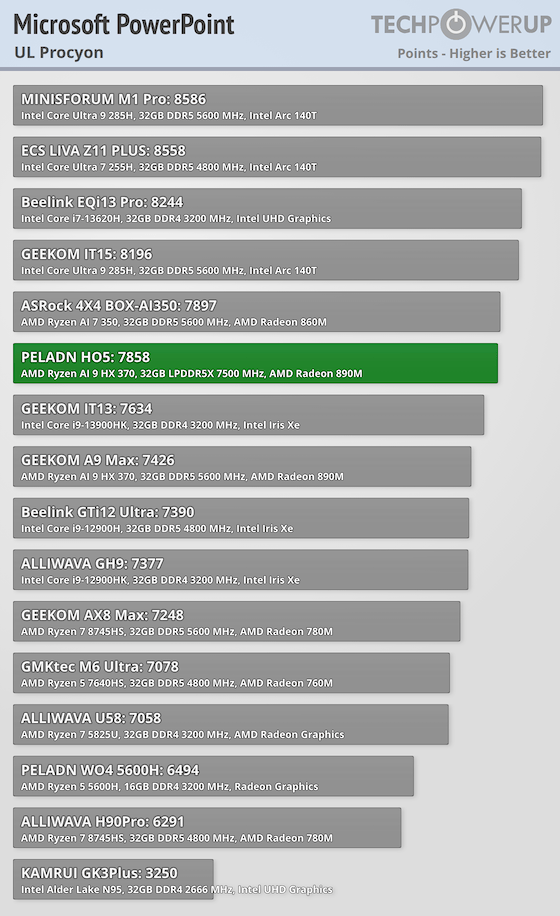
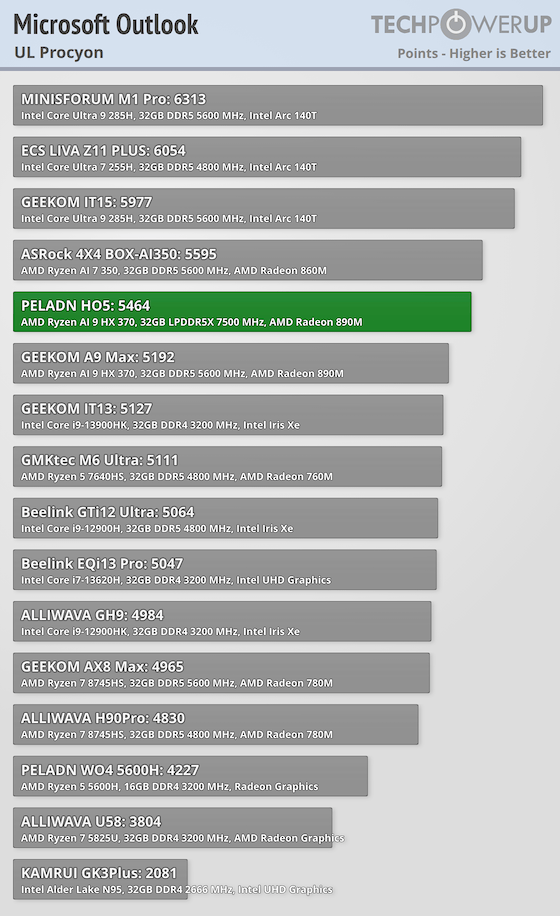
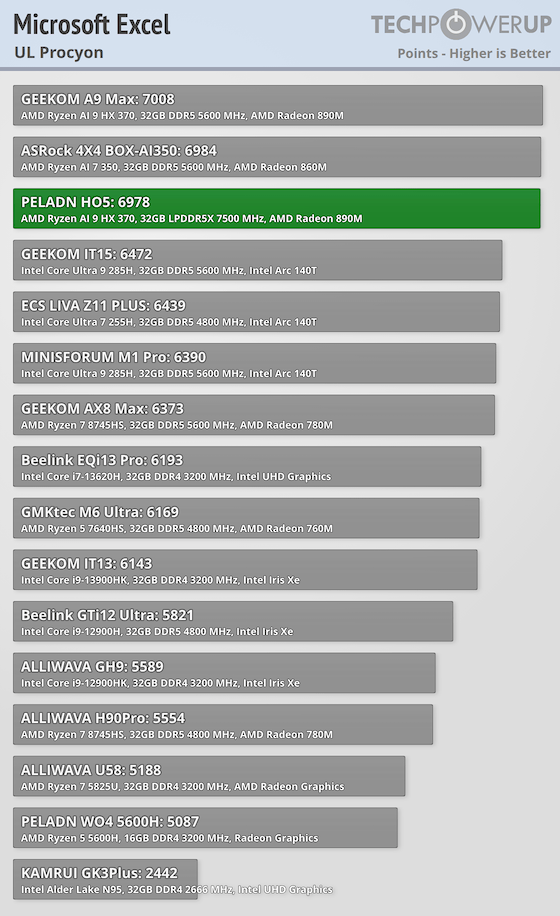
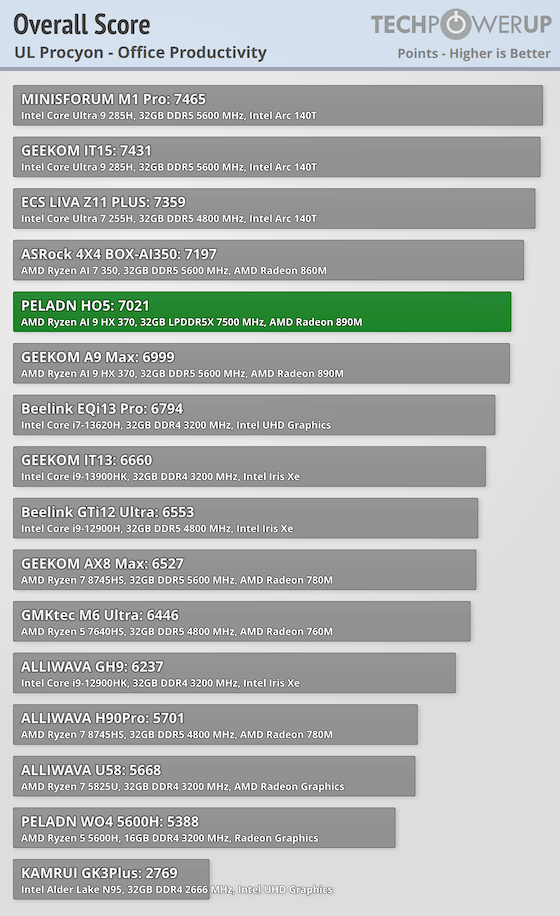
In UL Procyon Office, the H05 lands at 7,021 overall, with 7,158 in Word, 6,978 in Excel, 7,858 in PowerPoint, and 5,464 in Outlook. It handles typical document and spreadsheet work very well, while Outlook drags the average down a bit compared to the other apps.
Content Creation and Media Encoding
Photoshop
PugetBench for Photoshop uses real actions like filter stacks, layer adjustments, and compositing. It measures both interactive responsiveness and how long complex edits take to apply.
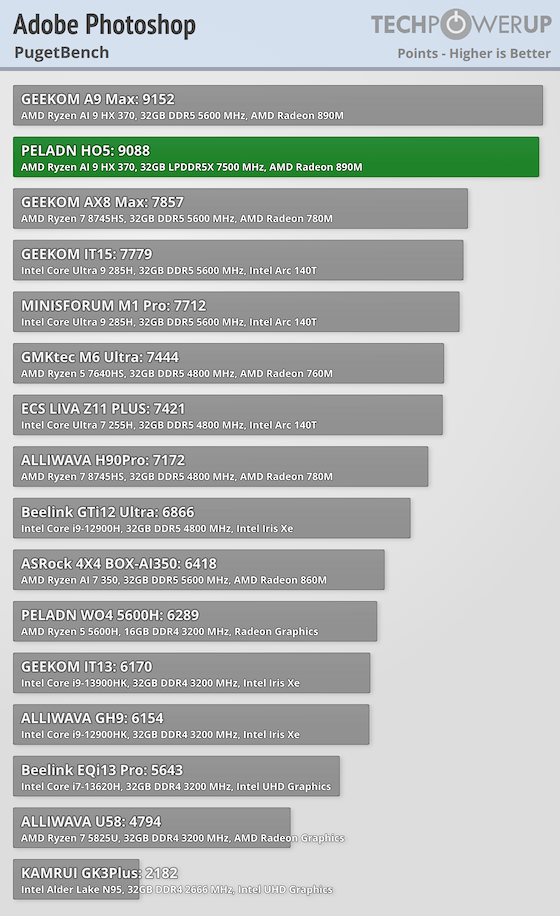
In PugetBench for Photoshop, the H05 scores 9,088, which is a high mark for this class of Mini-PC. It points to strong performance for common photo workflows, especially when you are stacking your edits and working across tons of layers.
Blender
Blender's benchmark measures 3D rendering across multiple test scenes. It's an effective way to see how a CPU and GPU perform in creative and technical workloads.
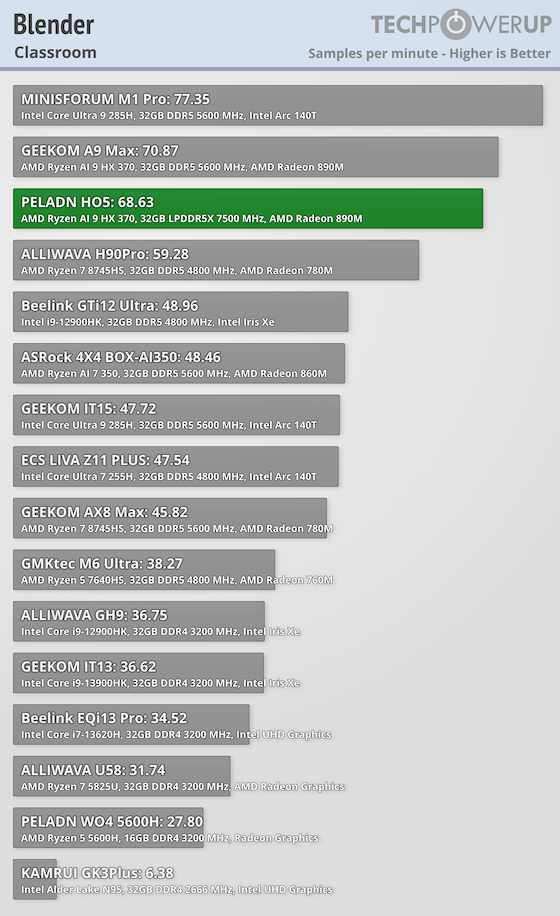
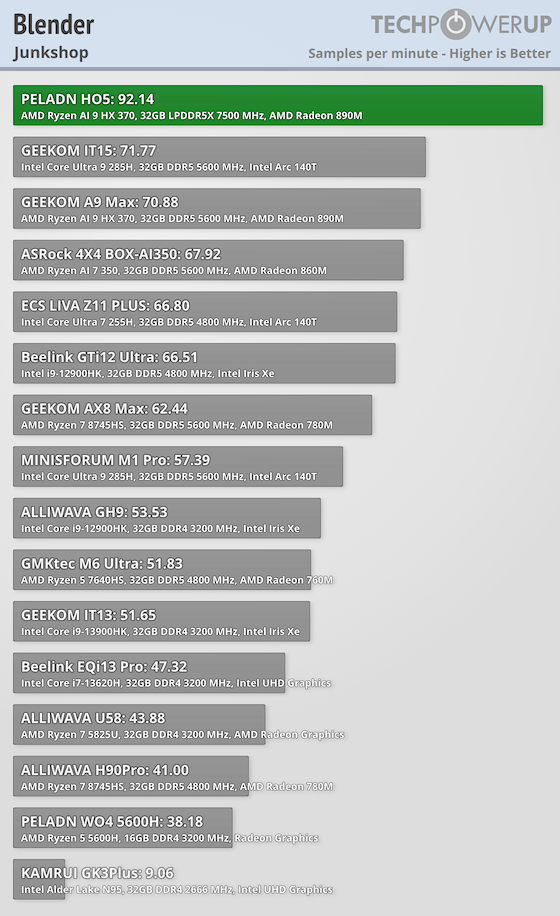
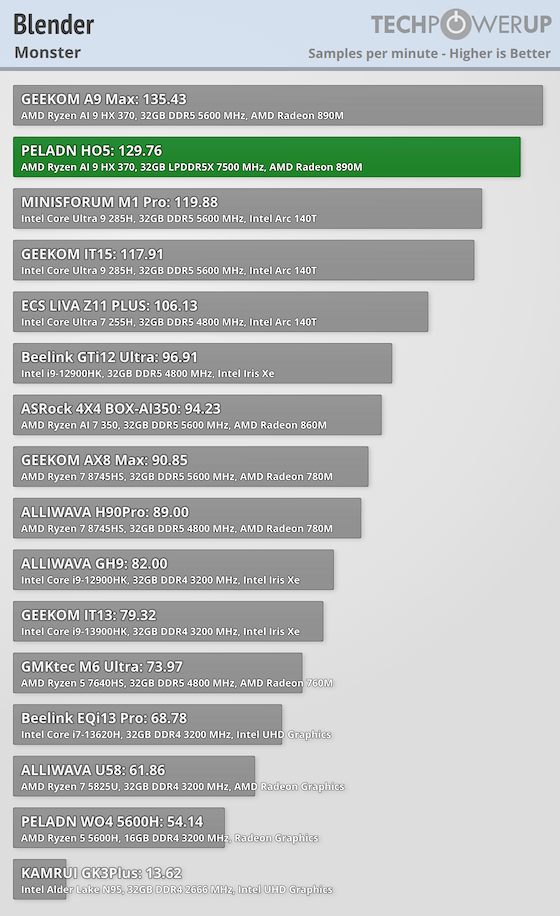
In Blender, the H05 scores 129.76 (Monster), 68.63 (Classroom), and 92.14 (Junkshop). Lighter scenes and general viewport work are fine, but very heavy rendering still massively benefits from a discrete GPU.
Media Encoding
HandBrake is a popular open-source transcoder, and its benchmark tests how quickly a system can convert video using the x264 codec. It's a real-world scenario for streamers and media professionals.
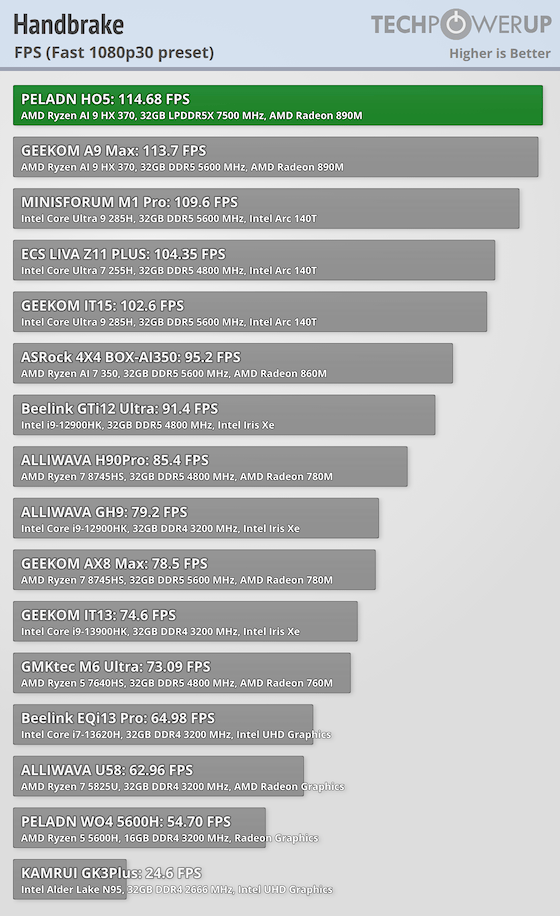
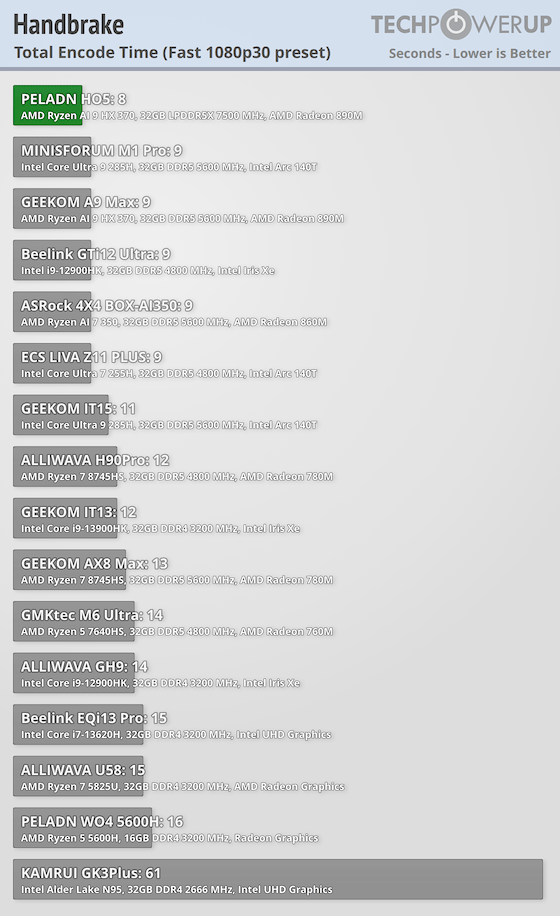
In HandBrake, the H05 averages 114.68 FPS and completes the encode in 8 seconds on the tested preset. That's excellent throughput for a compact system.
Workstation Performance
SPECviewperf simulates professional workloads from applications like 3ds Max, CATIA, Maya, and SolidWorks. It measures how responsive a system is when working with complex models in CAD, animation, and visualization. Higher scores mean smoother, better performance in that type of workload. Here is a run-down of what each viewset is testing:
- 3dsmax-06: based on Autodesk 3ds Max, this stresses general 3D modeling and rendering performance, like moving large objects around in a scene.
- catia-05: derived from Dassault CATIA, widely used in aerospace and automotive design, this highlights CAD-style precision modeling.
- creo-02: from PTC Creo, another engineering design package, this is heavy on assemblies and parametric models.
- maya-05: mirrors Autodesk Maya, which is all about animation, rigging, and visual effects, making it a test of real-time artistic workflows.
- medical-02: simulates medical imaging and visualization (things like rotating MRI or CT scans).
- sw-04: short for SolidWorks, this represents mechanical CAD and engineering visualization, used heavily in product design
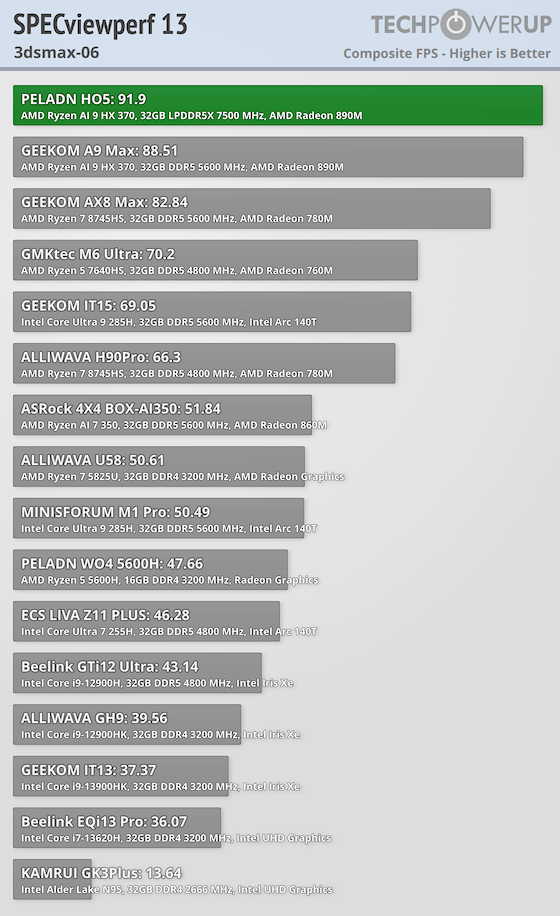
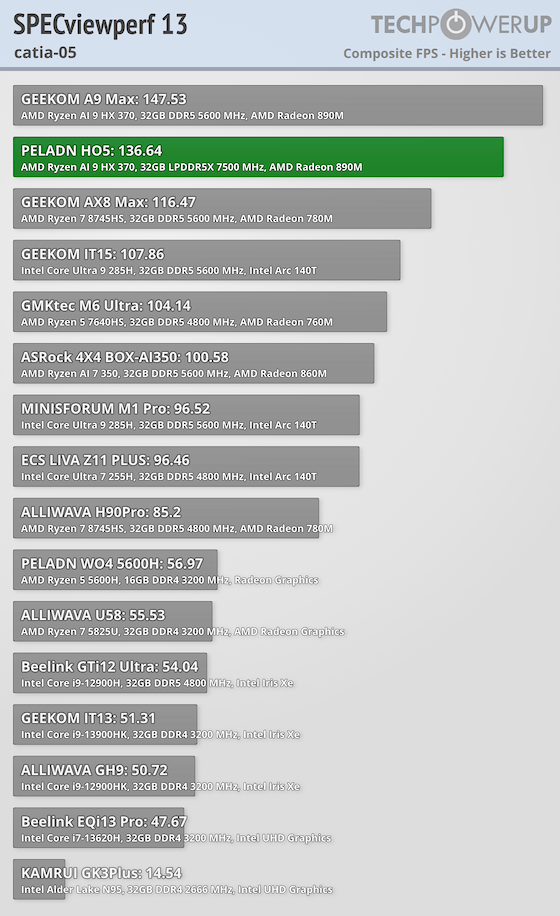
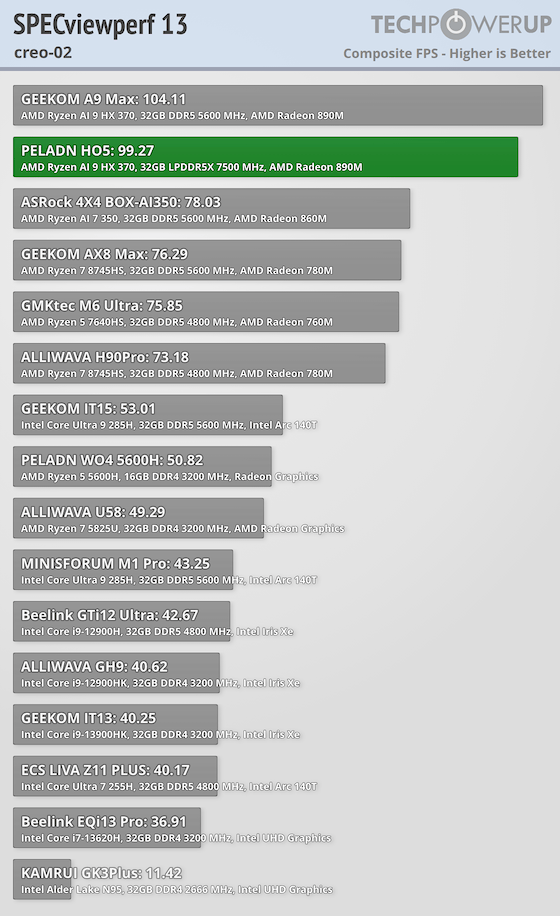
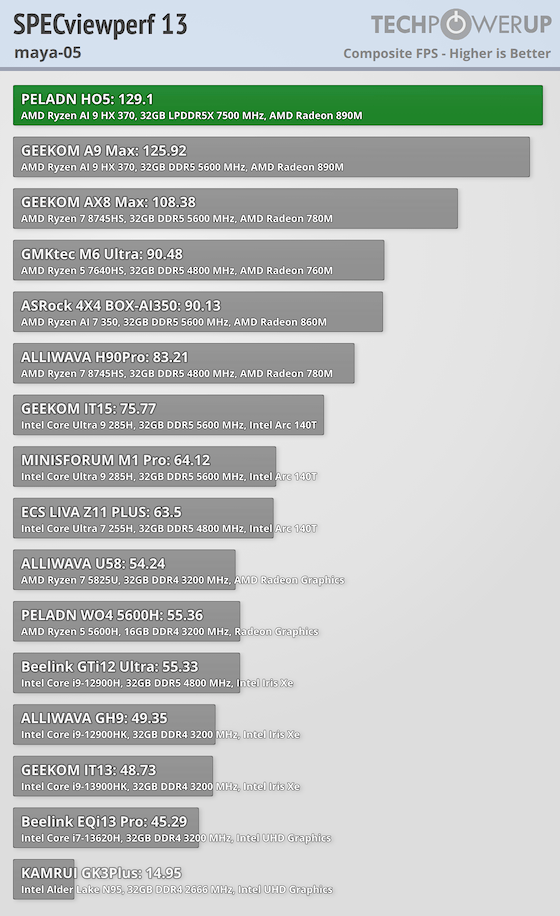
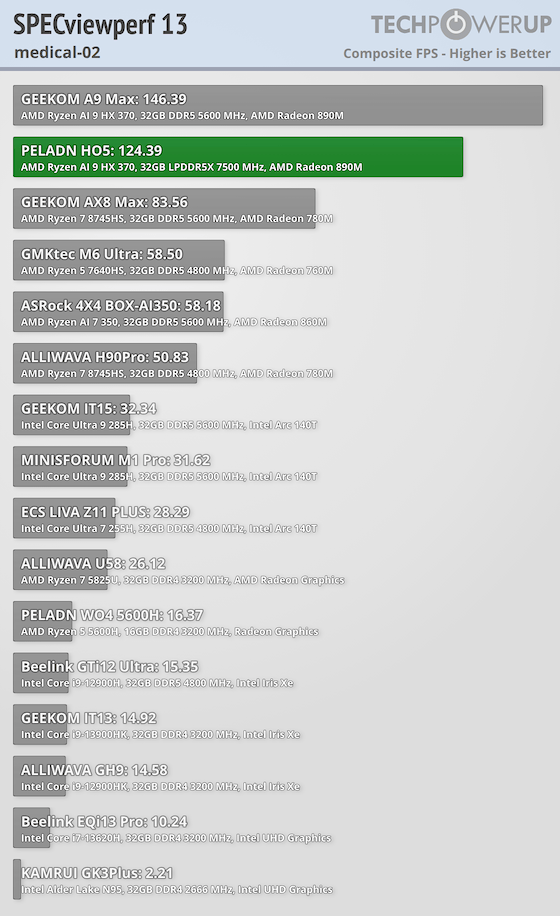
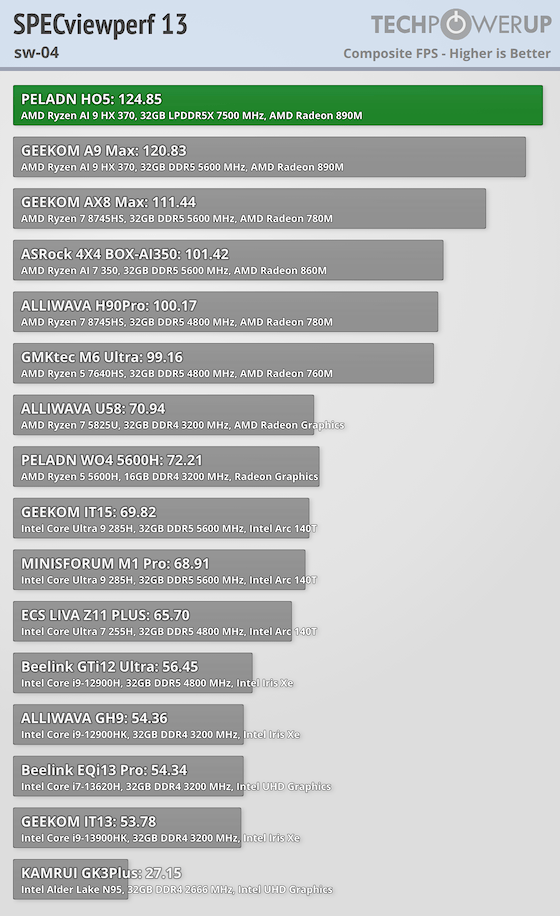
In SPECviewperf 13, the H05 posts 91.9 (3dsmax-06), 136.64 (catia-05), 99.27 (creo-02), 129.1 (maya-05), 124.39 (medical-02), and 124.85 (sw-04). Overall, these are very good iGPU workstation numbers, particularly in CAD-leaning viewsets like CATIA and SolidWorks where the H05 comes in with a lot of usable performance for lighter pro work.
AI Performance
The Procyon AI benchmark measures inference times on popular models like MobileNet, ResNet, and YOLO. It's designed to show how well a system can accelerate machine learning tasks in real use.
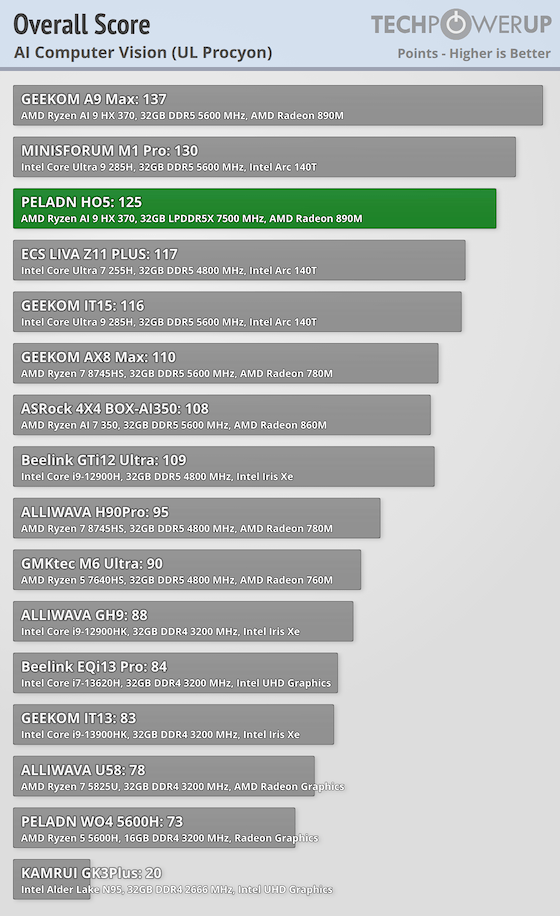
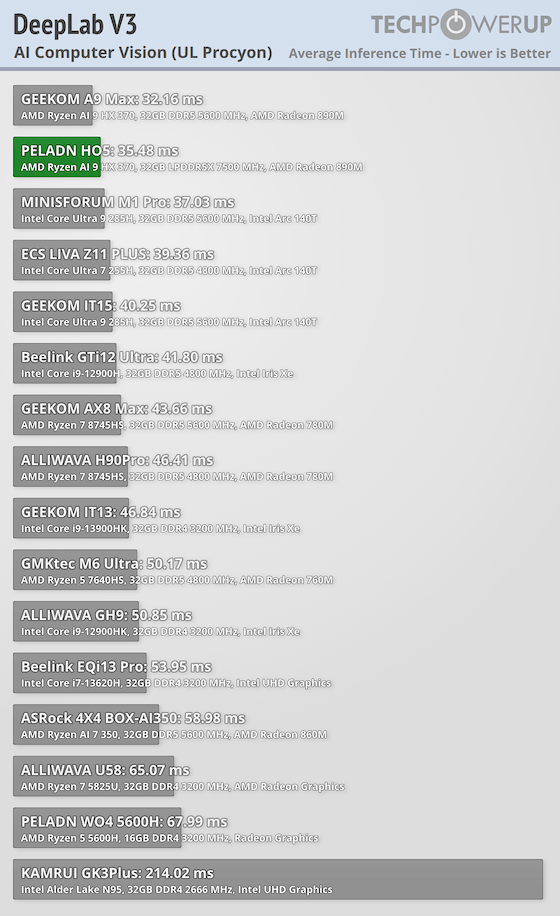
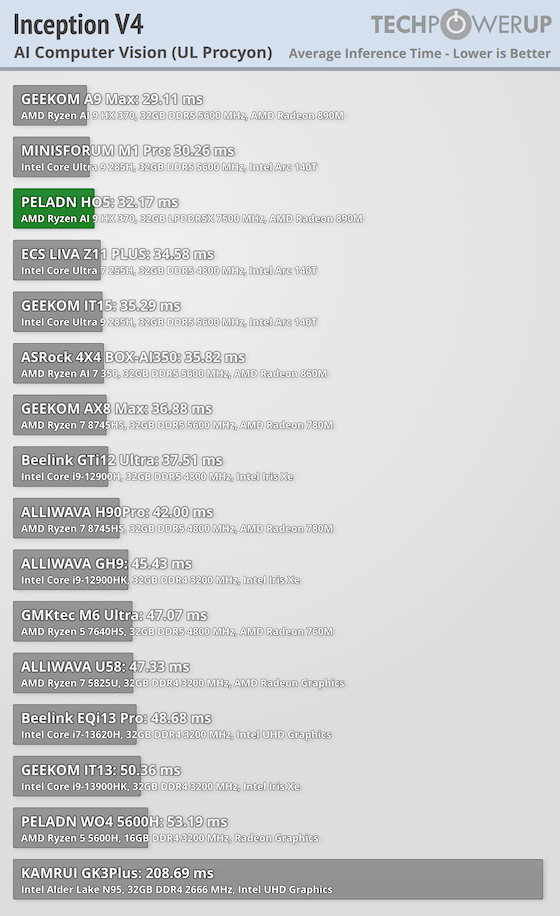
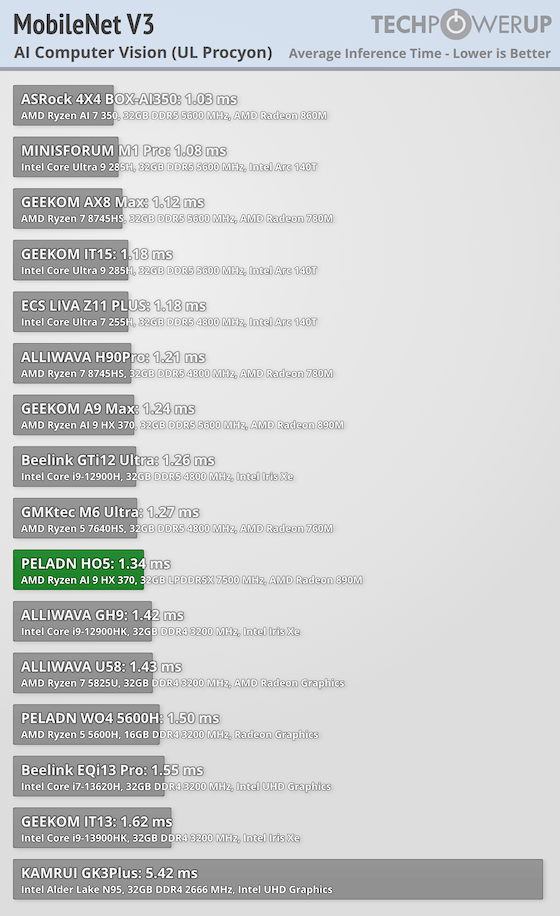
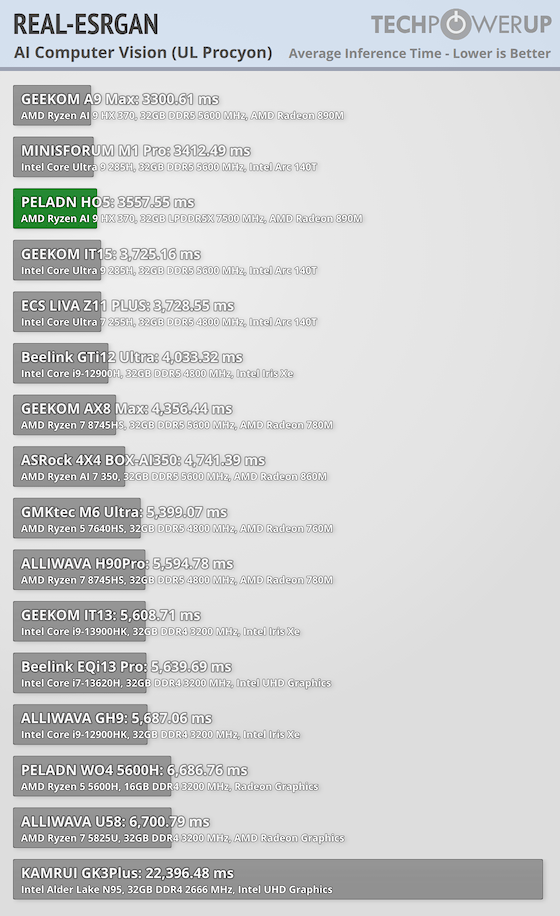
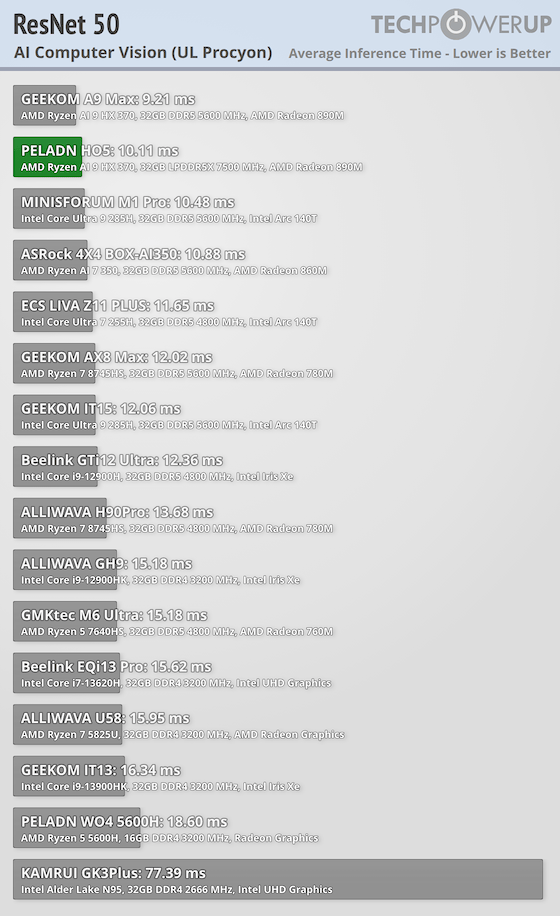
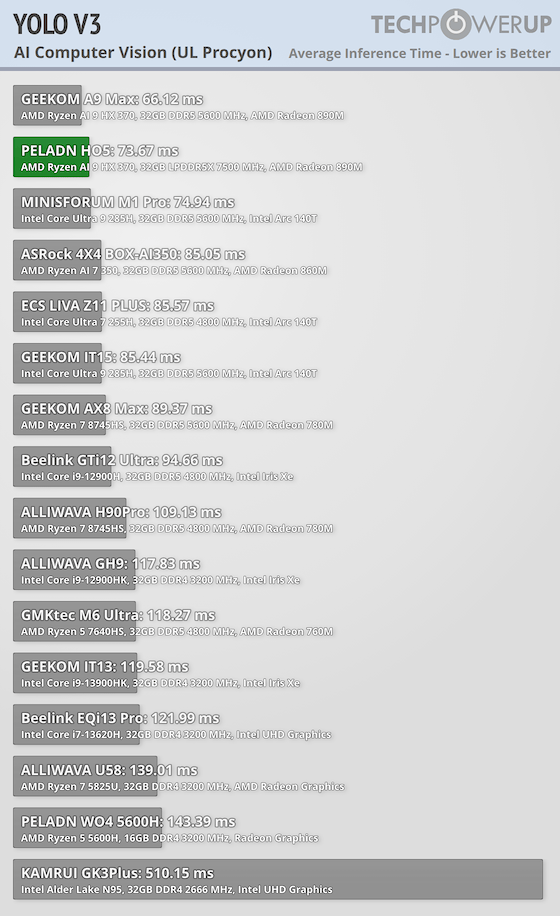
In UL Procyon AI Computer Vision, the H05 scores 125 overall, and the per-test times include 1.34 (MobileNet V3), 10.11 (ResNet 50), 32.17 (Inception V4), 35.48 (DeepLab V3), 73.67 (YOLO V3), and 3557.55 (Real-ESRGAN). The lighter classification workloads finish quickly, while Real-ESRGAN is the clear outlier and will, as expected, take a long time on integrated graphics.
Storage Performance
CrystalDiskMark
CrystalDiskMark measures raw sequential and random read and write speeds of storage devices. It provides a quick look at how well a drive handles large file transfers and lighter mixed workloads.
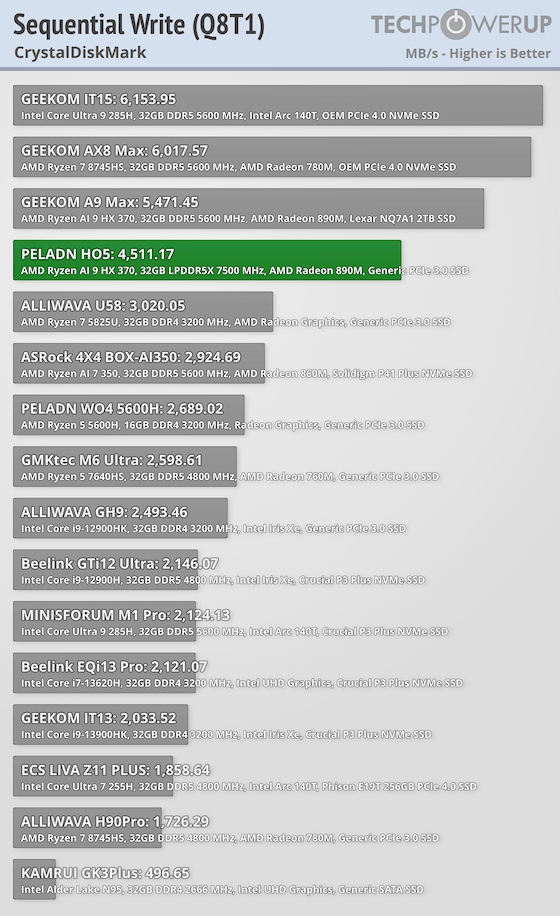
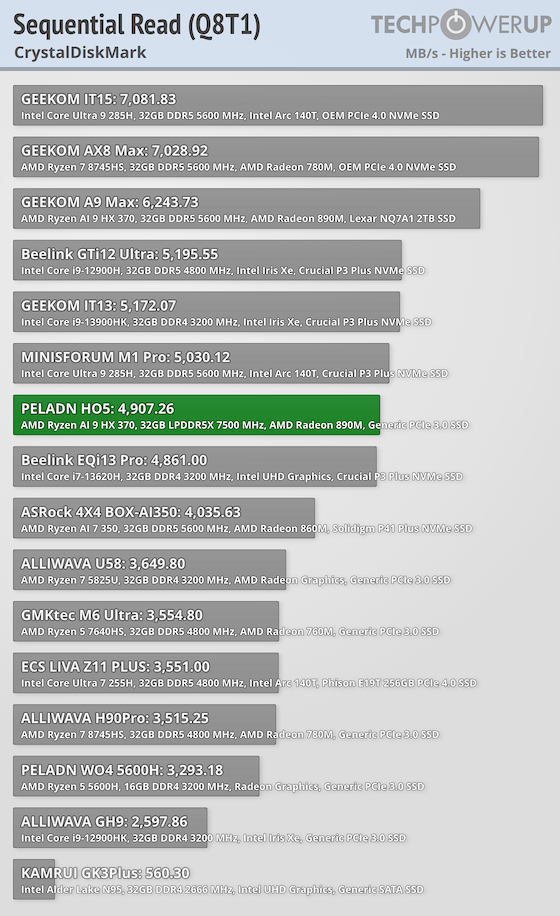
In CrystalDiskMark, the H05's Crucial P3 Plus SSD hits 4,907.26 MB/s sequential read and 4,511.17 MB/s sequential write (Q8T1). That is solid PCIe Gen 4 performance and should feel quick for boot, app loads, and large file transfers.
3DMark Storage
3DMark's storage test simulates real-world gaming behavior such as level loading, asset streaming, and background patching, offering a more practical view of storage performance than raw throughput alone.
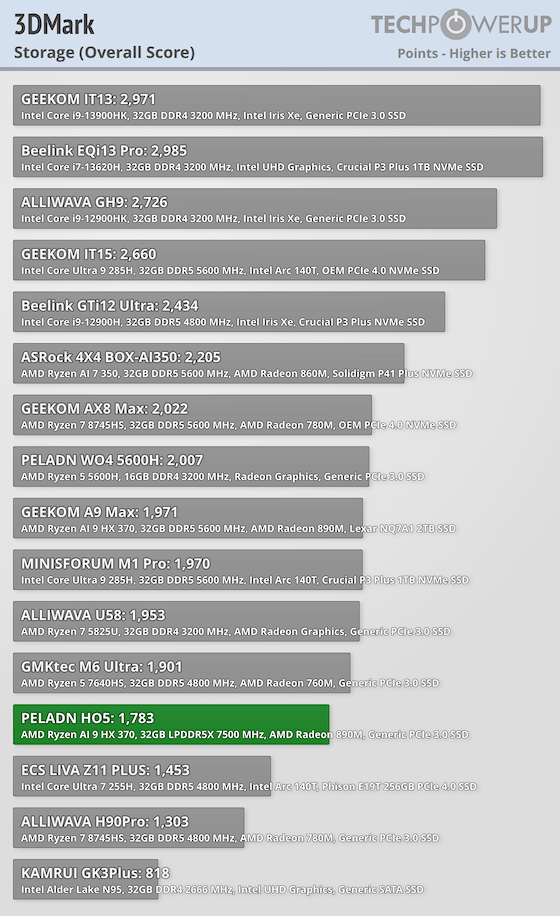
In 3DMark Storage, the H05 scores 1,783, which is decent real-world game and app loading behavior rather than just strong peak throughput. For frequent large game installs and big library shuffling, it should work well.
AAA Gaming
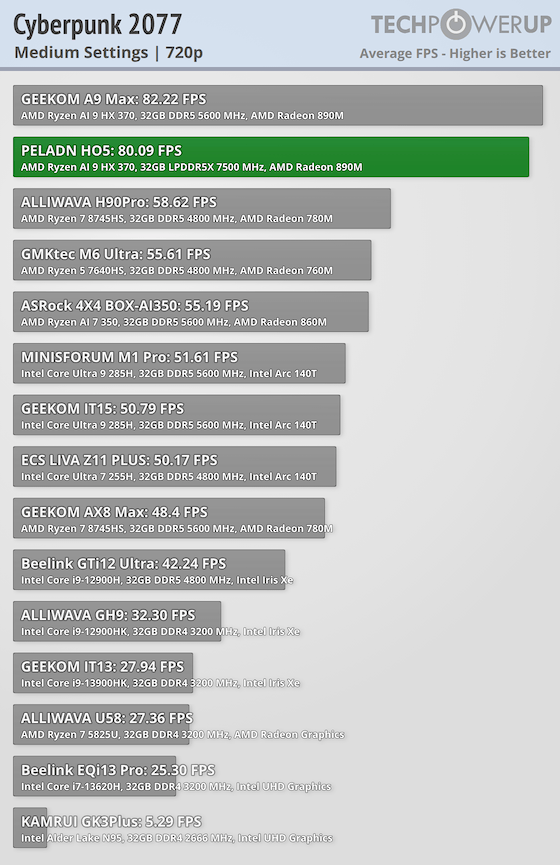
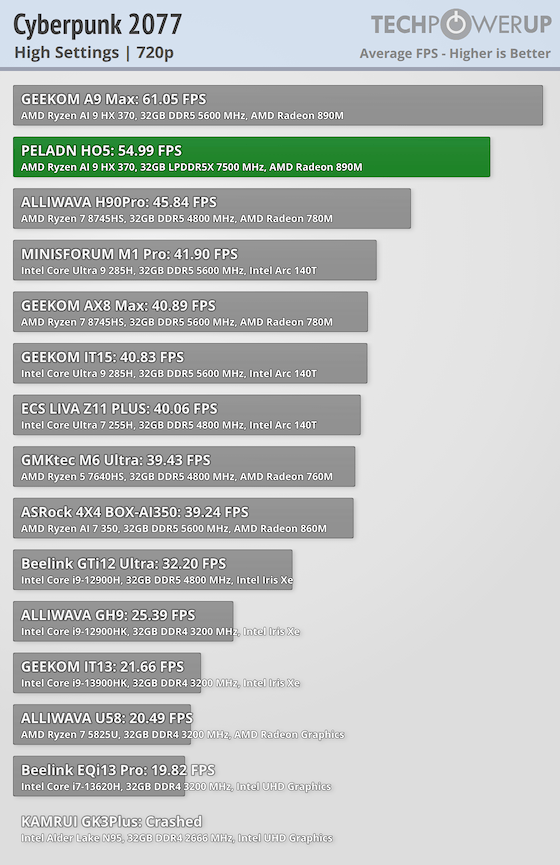
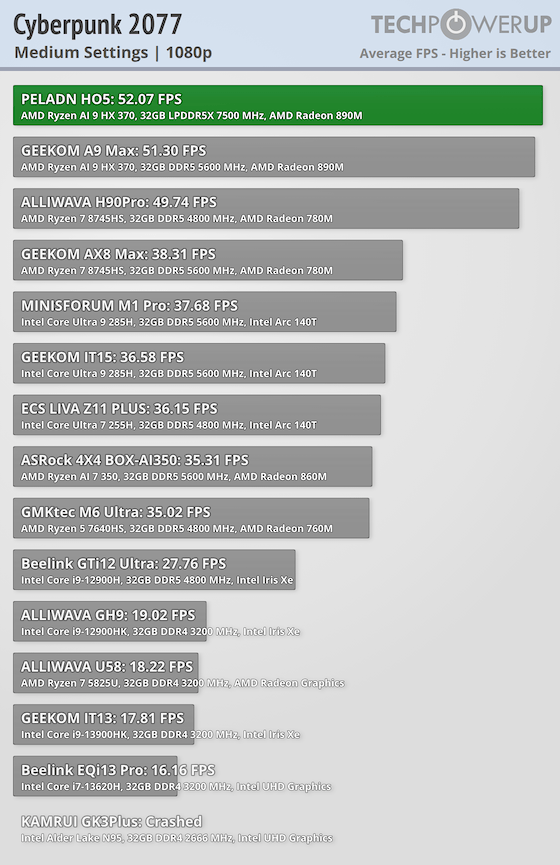
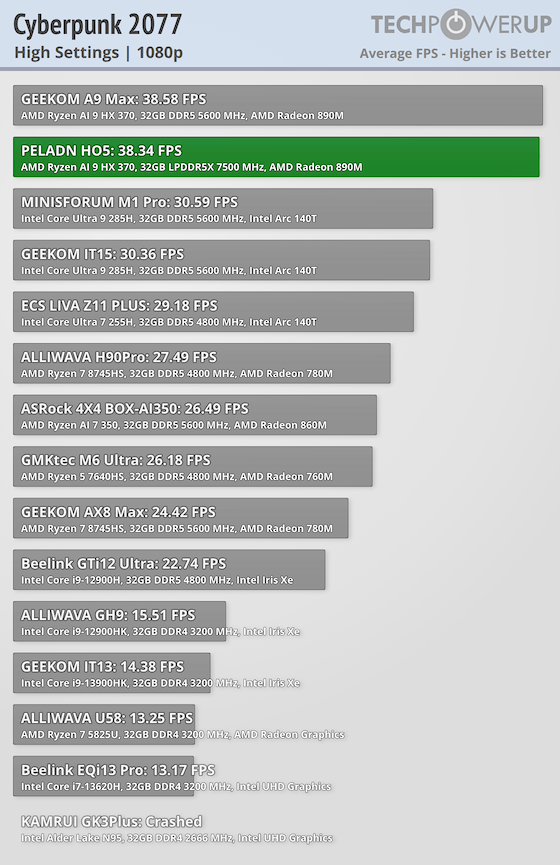
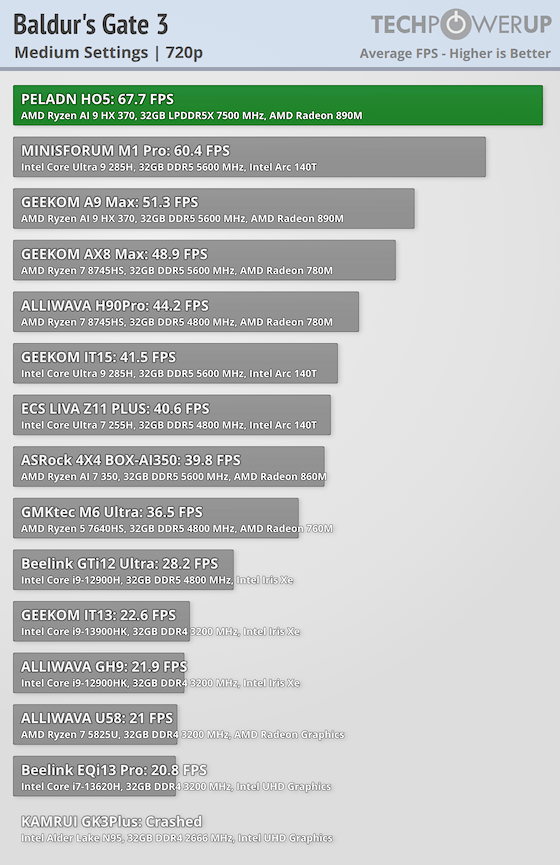
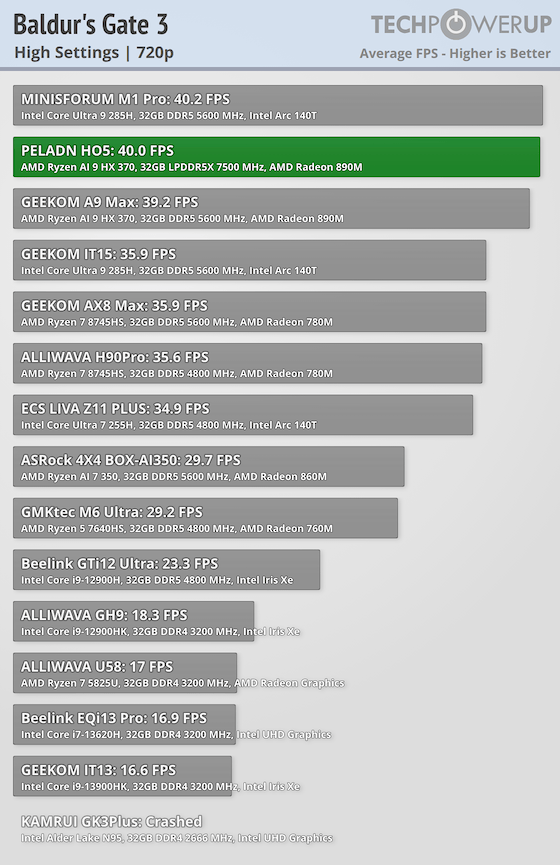
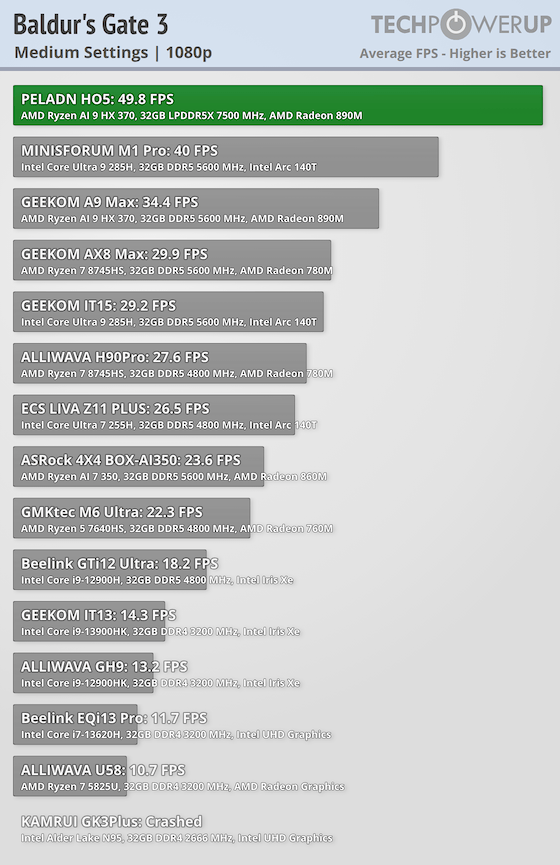
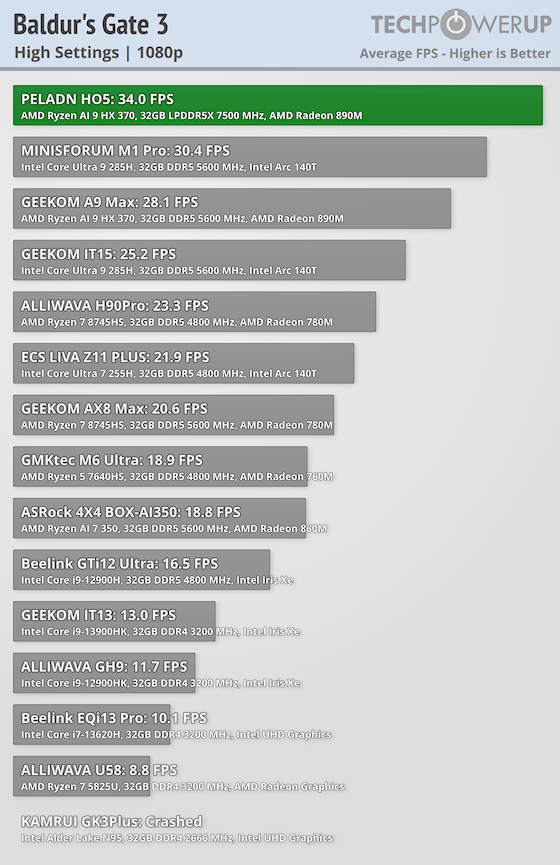
In Baldur's Gate 3, the H05 runs best when you keep it to Medium settings. At lower resolutions it feels smooth, while 1080p is still workable on Medium but starts to feel strained once you move to High. Cyberpunk 2077 performs very well for an integrated GPU, staying very playable at 720p and holding together at 1080p as long as you avoid cranking up the visual settings.
eSports
Competitive titles like Dota 2 and CS2 are less demanding, making them better suited for integrated GPUs. Benchmarks here focus on maintaining smooth frame rates at common, default settings.
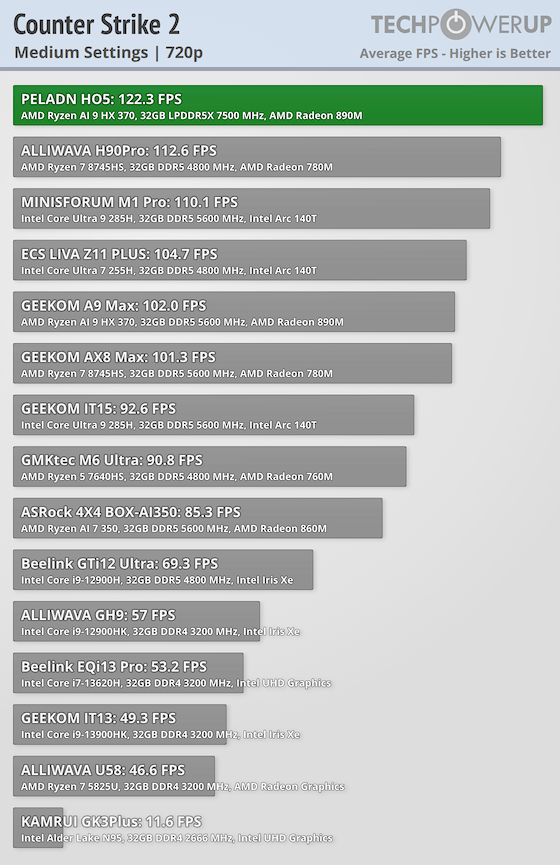
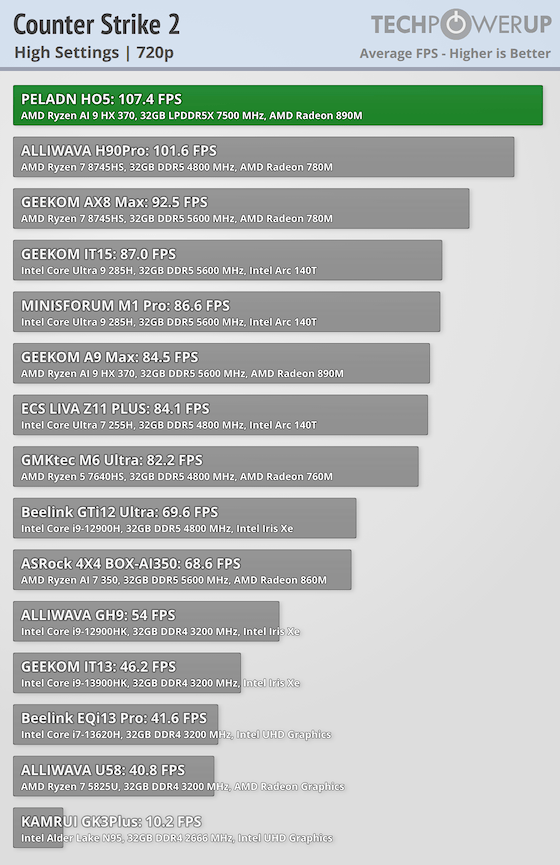
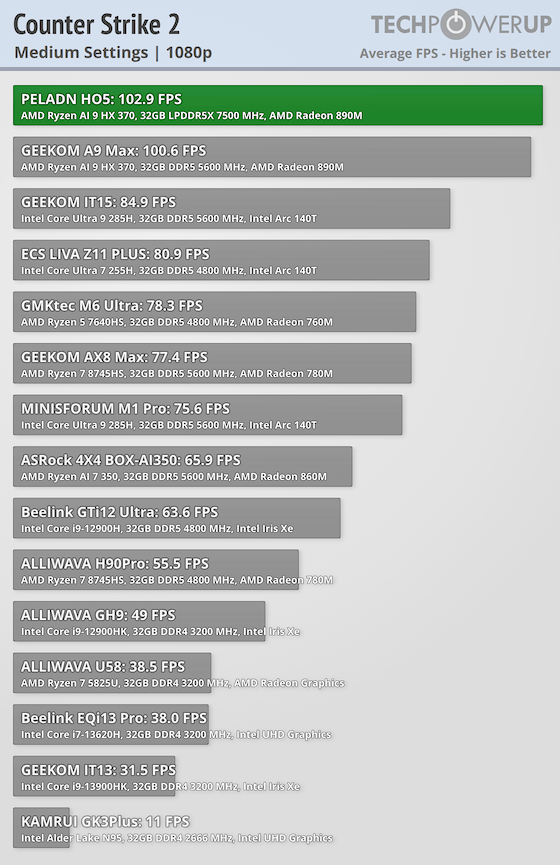
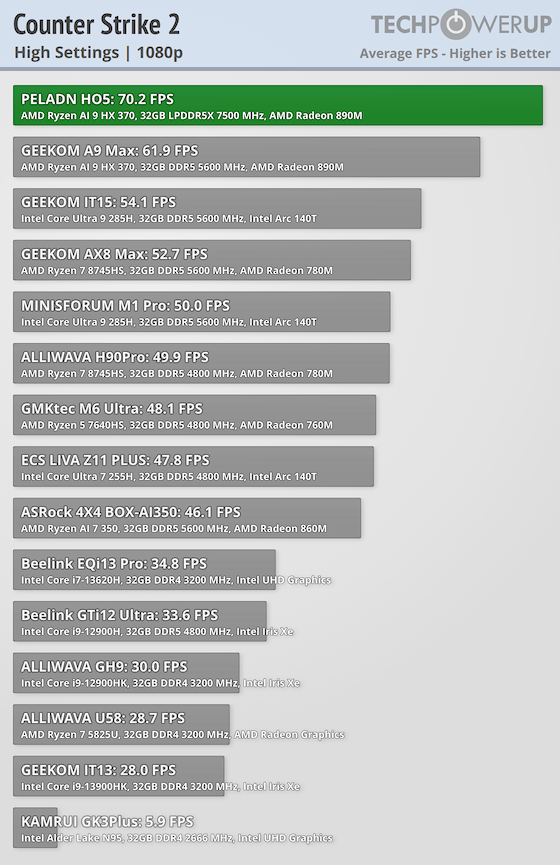
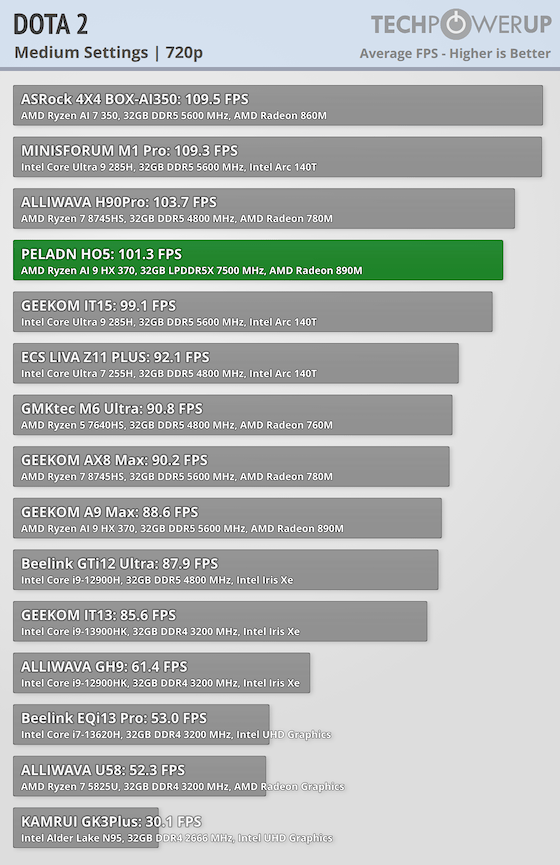
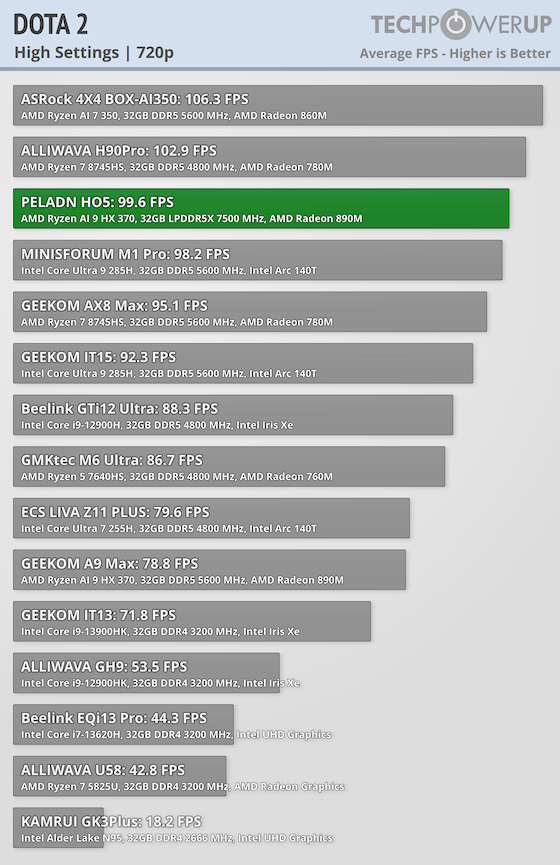
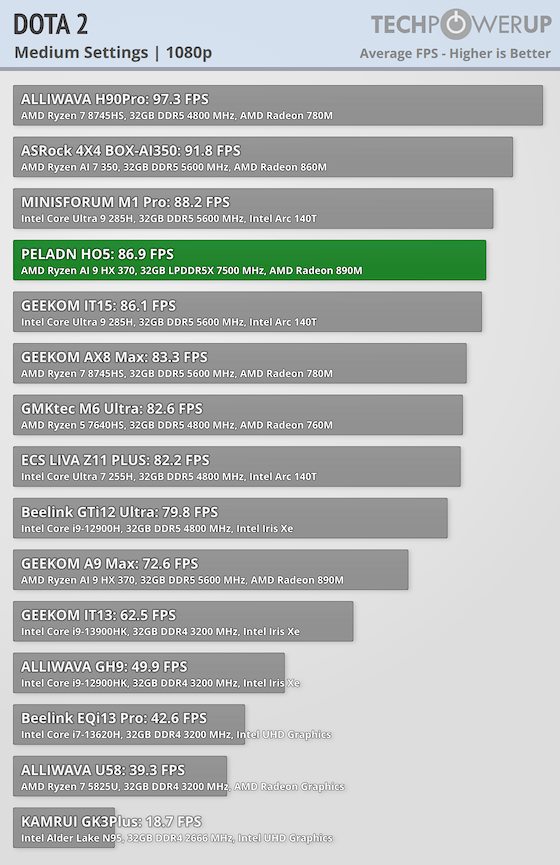
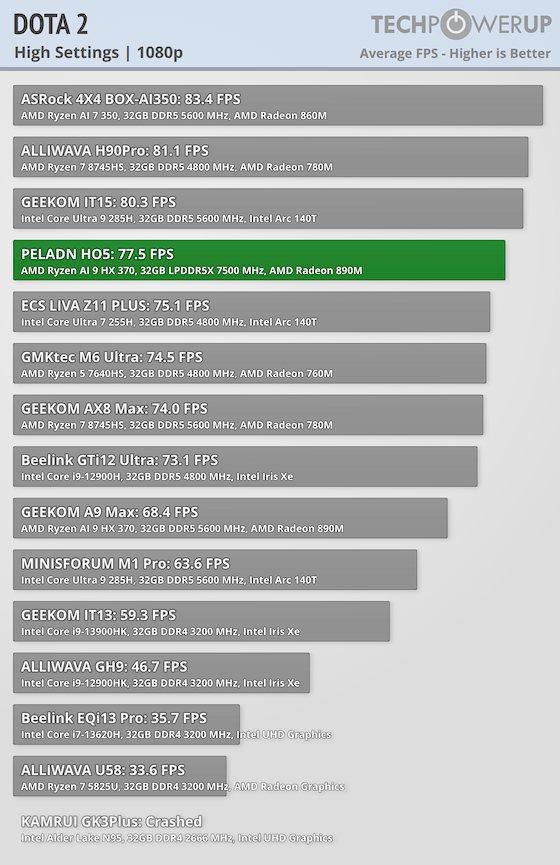
For eSports titles, the H05 performs excellent. Counter-Strike 2 delivers high frame rates at both 720p and 1080p, making it easy to prioritize smoothness for competitive play. Dota 2 also runs comfortably at 1080p, even on higher settings, which makes the H05 a solid option if you are looking for a system to play lighter or competitive games.
Nintendo Switch Emulation
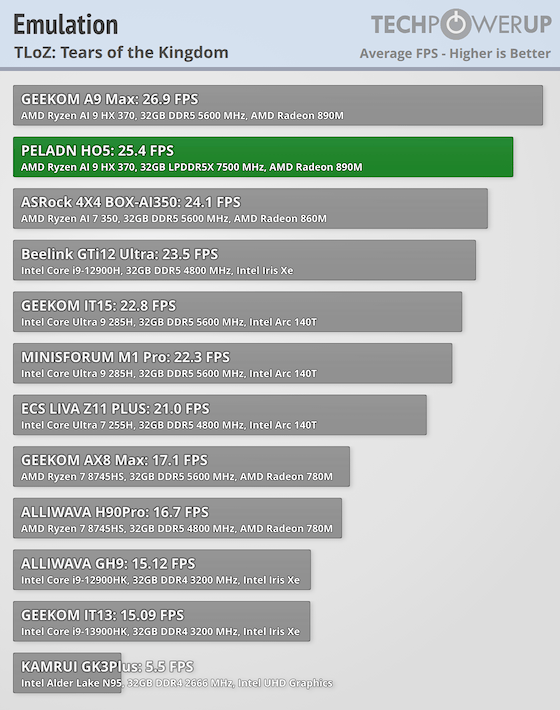
Tears of the Kingdom remains one of the most demanding titles to emulate, and on the H05 it averages 25.4 FPS in our testing. That places it among the stronger results we have seen from an integrated graphics Mini-PC so far. Compared to many other compact systems, the Radeon 890M clearly benefits from the higher memory bandwidth and newer architecture here.
That said, even at 25 FPS on average, it is still below what most people would consider comfortably playable. Frame pacing can fluctuate in heavier scenes, and busy areas introduce noticeable slowdowns. For lighter Switch titles, performance should be much better, and older platforms such as 3DS, Wii, PS2, and classic consoles run without issue. As a Switch emulation box for the heaviest games, though, the H05 is close but not quite there yet.
3DMark
3DMark provides a set of synthetic benchmarks designed to evaluate graphics and CPU performance across different generations of gaming workloads, from lighter DX11 tests to more demanding DX12 scenarios.
Night Raid
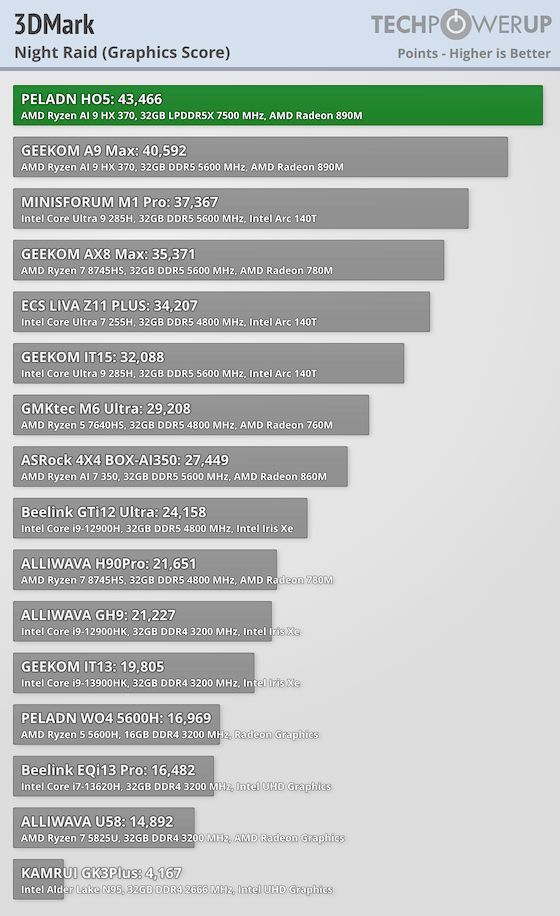
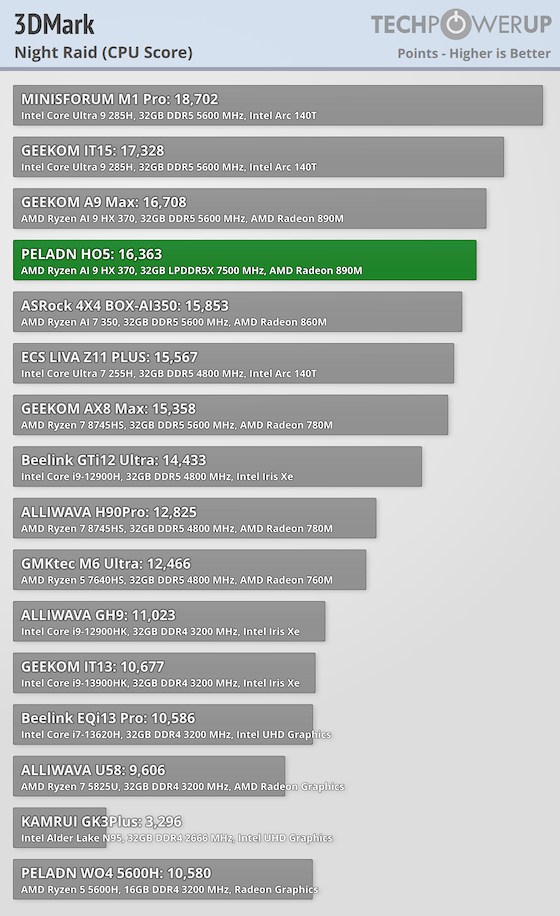
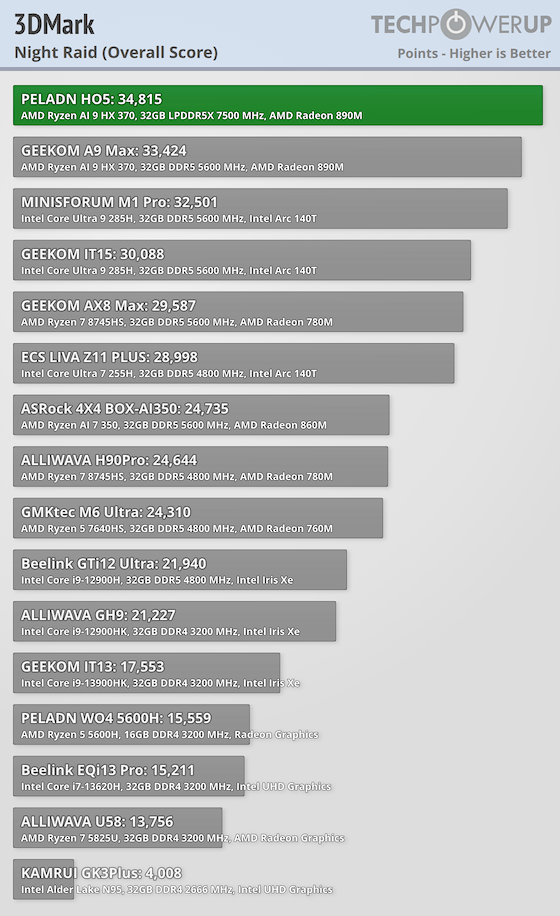
In Night Raid, the H05 scores 43,466 in graphics and 16,363 in CPU, leading to 34,815 overall. This is a very strong lighter workload result.
Time Spy
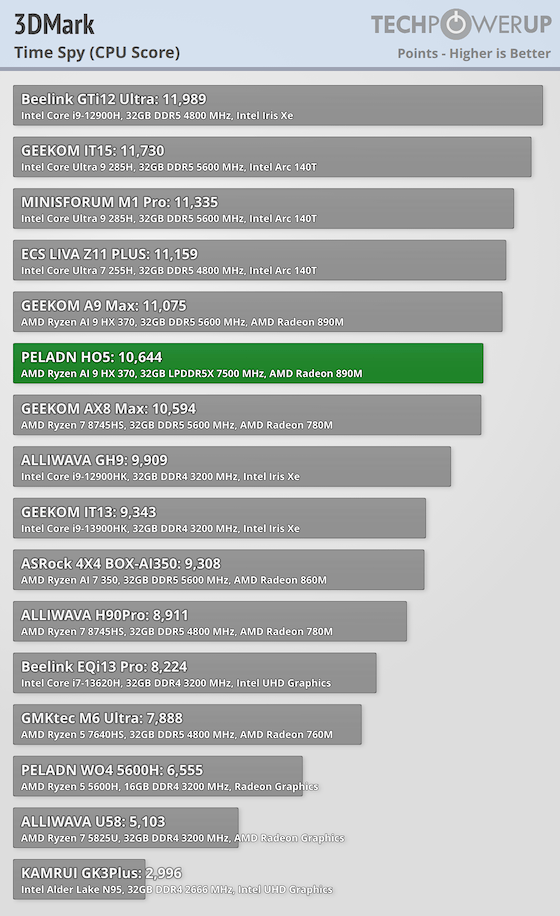
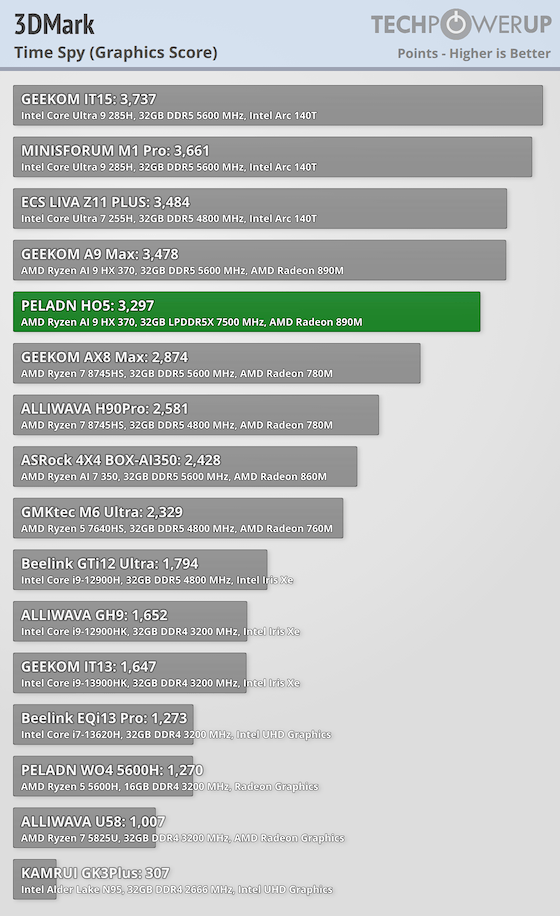
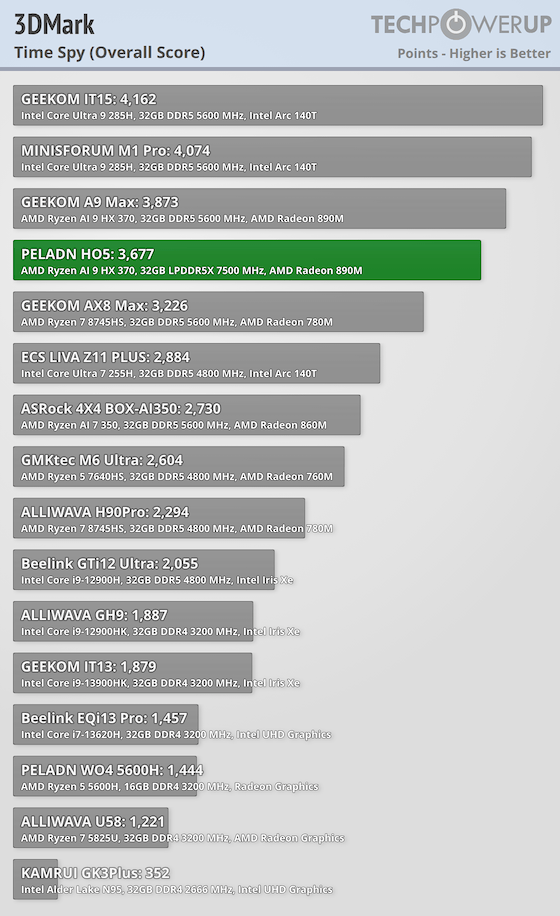
In Time Spy, the H05 posts 3,297 graphics and 10,644 CPU, for 3,677 overall. The GPU score is the limiter for modern DX12-heavy gaming, but it's still a strong result for integrated graphics, and it backs up the solid real-game FPS at 720p and 1080p Medium in our gaming benchmarks.
Fire Strike
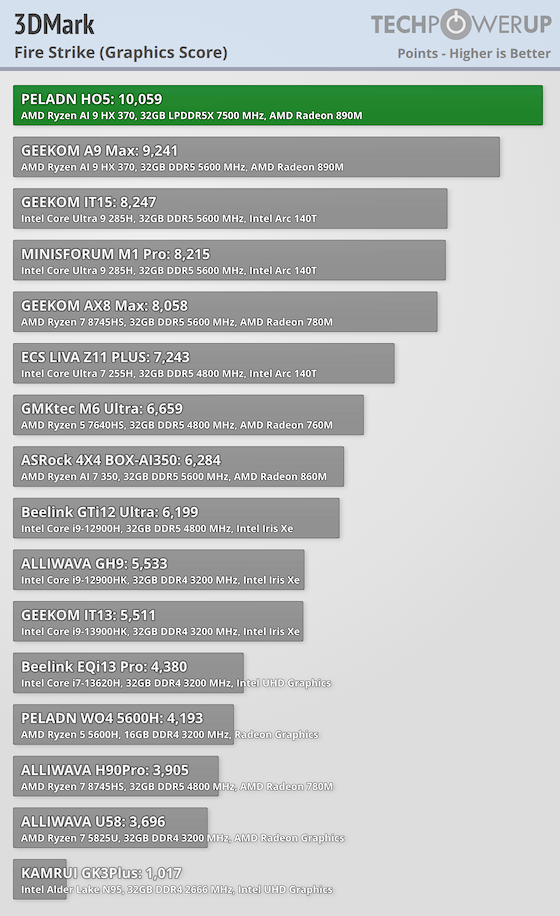
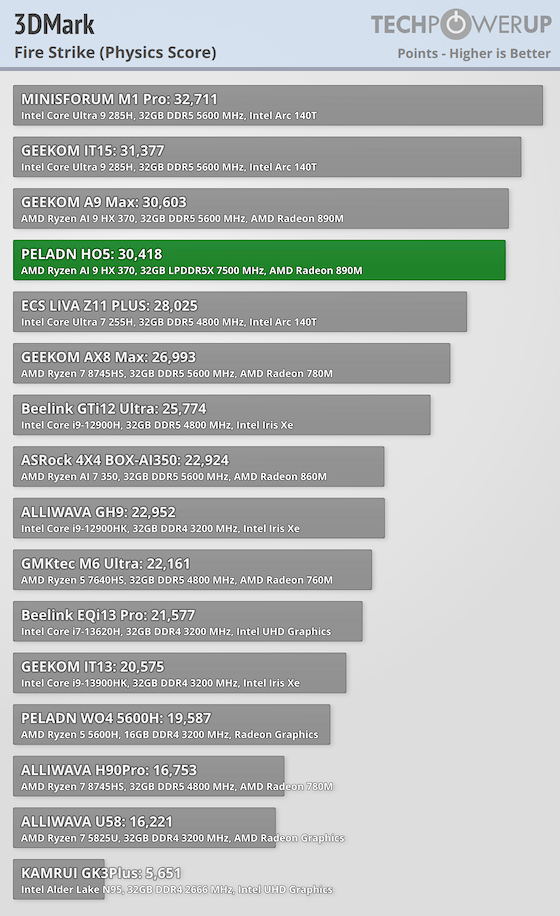
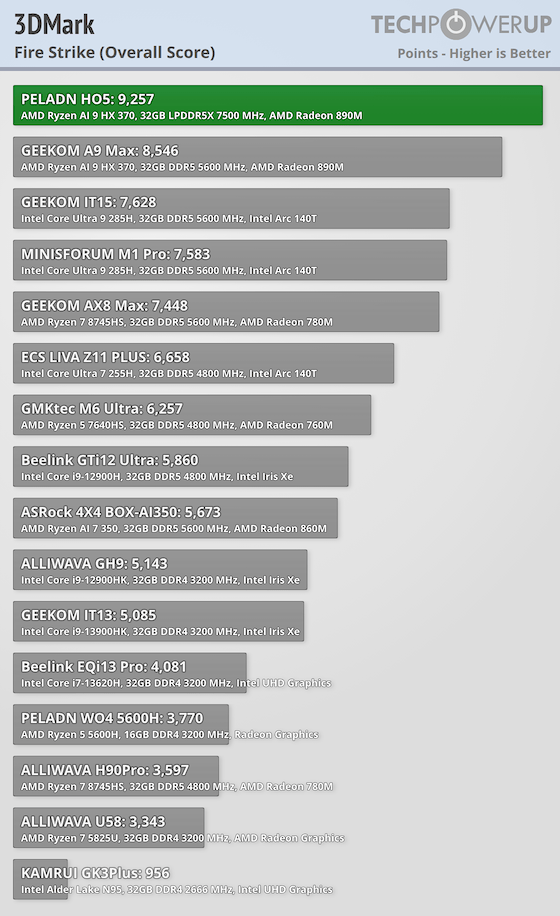
In Fire Strike, the H05 scores 10,059 in graphics, 30,418 in physics, and 9,257 overall. This is a strong result for a Mini-PC with integrated graphics, showing that the CPU easily handles physics-heavy workloads, while GPU performance is good enough for older and less demanding games at moderate settings.
Power and Noise Levels
Power and efficiency are just as important as raw performance in a compact system, so I measured how much it draws at idle, under CPU stress, during GPU-heavy tests, and while gaming. These measurements were captured using a Shelly smart power relay, taking advantage of its API-based logging to track real-time wattage and build accurate per-second consumption profiles. I also monitored the system's noise levels while idle and when under sustained load.
Idle Power Draw
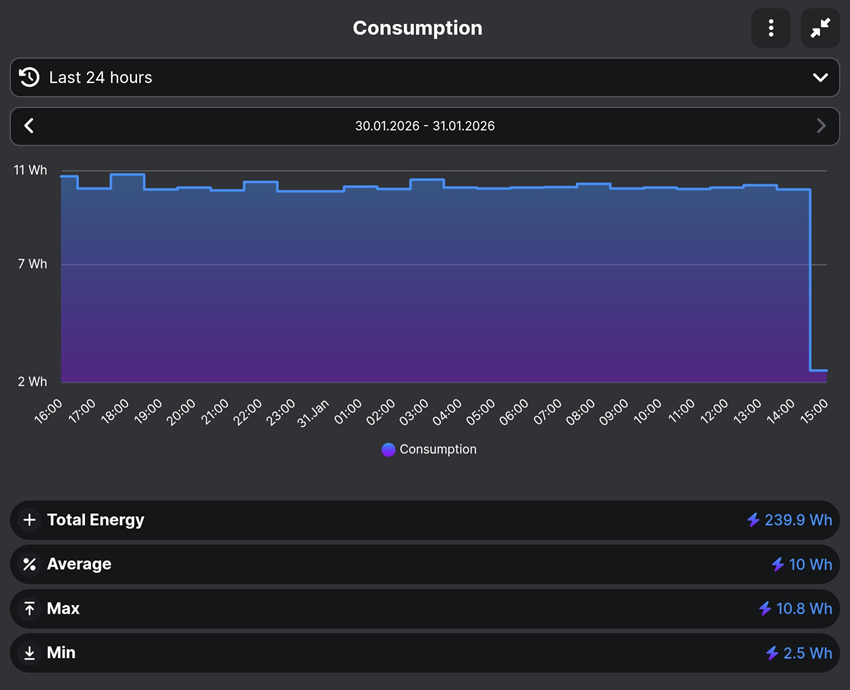
Over a full 24-hour idle monitoring period with the display turned off, the system consumed 0.2399 kWh, averaging 10 W, with a maximum of 10.8 W and a minimum of 2.5 W. For most of the day, power draw stayed tightly grouped just under the 11 W mark, indicating very steady idle behavior with no real background spikes or unexplained activity. Just as a note, the sharp drop at the end of the chart can be ignored, as it reflects how the monitoring software closes out the logging window rather than a real change in system behavior.
At this sustained idle rate, continuous 24/7 operation would amount to roughly 88 kWh per year, translating to about $10–12 USD annually in typical North American electricity costs. While not the most power efficient mini we've seen, this places the system in line with what we expect from a modern Mini-PC.
CPU and GPU Power Draw
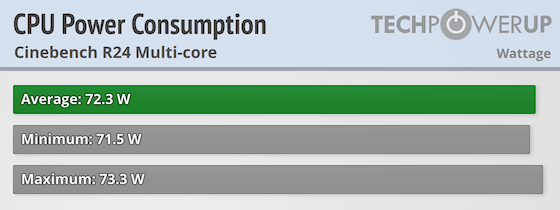
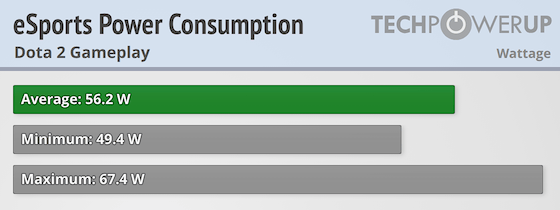
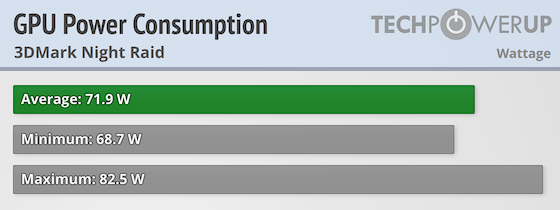
We also tested three real-world power-load scenarios: an esports gaming pass with Dota 2, which gives a good view of mid-load stability and clock consistency; a GPU-oriented run using Night Raid, which exposes how the APU reacts to scene changes and mixed rendering workloads; and a heavy Cinebench multicore pass that stresses all CPU cores simultaneously to show long-term power delivery.
Cinebench Multicore
During the Cinebench multicore run, the H05 HX370 averaged 72.3 W, with a minimum of 71.5 W and a maximum of 73.3 W. Power stays extremely flat throughout the test, which shows the CPU is locked into a sustained power target and holds it consistently without fluctuation or throttling.
eSports Gaming (Dota 2)
In Dota 2, power consumption averaged 56.2 W, dipping to 49.4 W in lighter moments and peaking at 67.4 W during heavier action.
3DMark Night Raid
Night Raid averaged 71.9 W, with a low of 68.7 W and a peak of 82.5 W during the more demanding scenes. The wider range is expected for a mixed CPU and GPU benchmark and shows the system ramping power up quickly when needed, then easing back during lighter transitions.
Here's a full view of the PELADN H05's power draw across all three profiles:
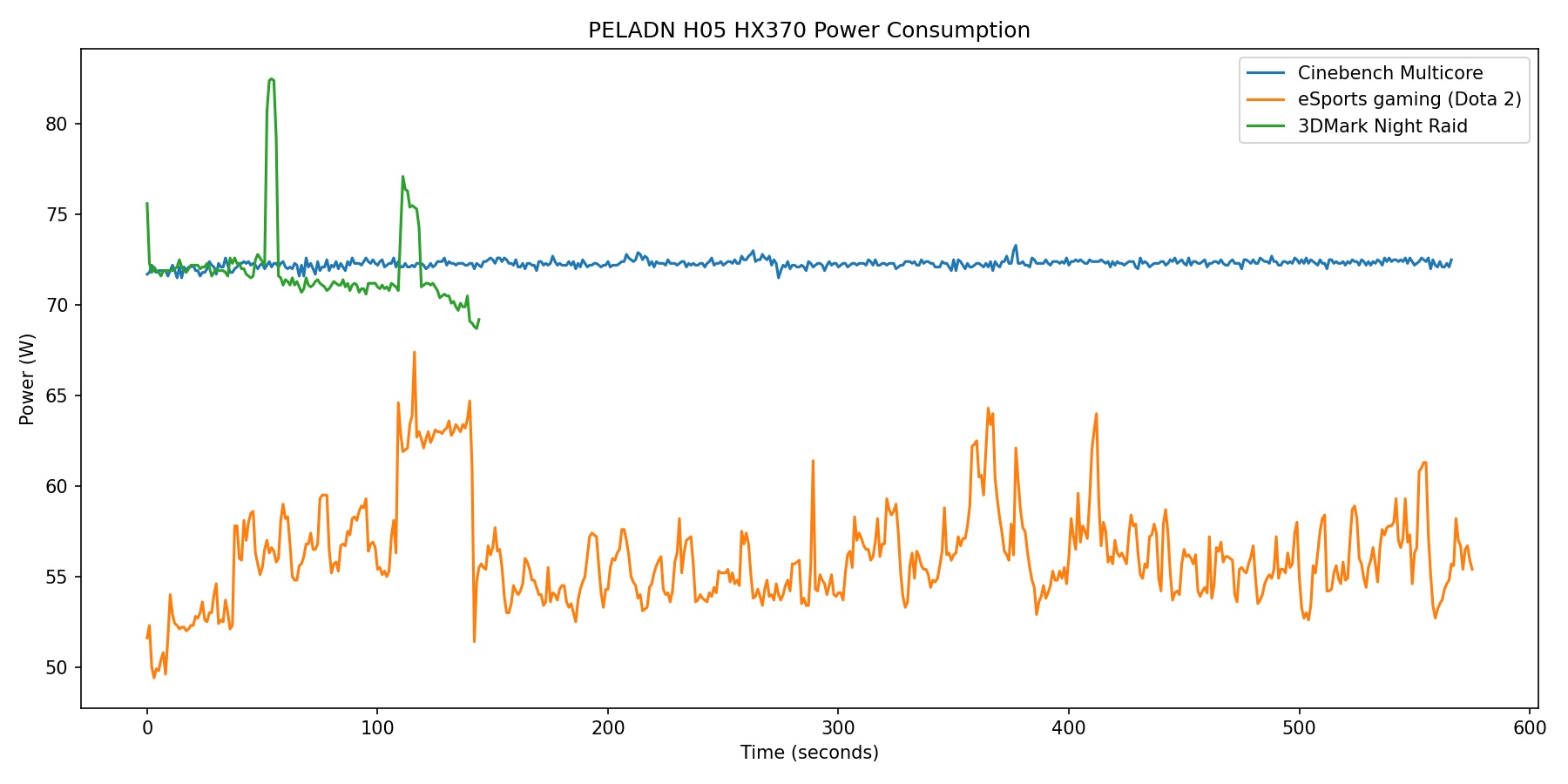
Overall, the PELADN H05 HX370 behaves in a very steady and predictable way when it comes to power use. It tends to draw more power during heavy CPU or mixed workloads, which points to a focus on keeping performance consistent, while gaming stays more restrained and better balanced for everyday use.
Noise Levels
Noise was measured using a digital sound level meter placed about 30 cm from the system. During idle and light everyday tasks like browsing, writing, or general productivity work, the H05 is effectively silent and disappears into the background of a normal room.
Once the system is pushed harder, such as during sustained stress tests, Cinebench multicore runs, or longer game installations through Steam, fan noise becomes clearly audible. Levels peak around 41 dB, and while that is on the slightly louder side for a Mini-PC, the sound itself is fairly steady and tends to blend into the background. There is a mild high-pitched tone at times during this intensive loads, which is most noticeable in very quiet rooms, but with any ambient noise present it becomes much less distracting.
Value and Conclusion
Pros:
- The PELADN H05 configured with the Ryzen AI 9 HX 370, 32 GB of LPDDR5X-7500 memory, and a 1 TB SSD is currently priced at around $920 USD.
- One of the best overall performers on our current leaderboards
- Great productivity and multitasking from the Ryzen AI 9 HX 370
- Radeon 890M delivers some of the strongest integrated gaming performance we've tested so far
- Fast LPDDR5X memory benefits both CPU-heavy tasks and integrated graphics
- Good creative and workstation benchmark results for an integrated GPU system
- Unique design and top panel LED lighting sets it apart from similarly-specced systems
- Competitive pricing for its class
Cons:
- Internal design makes accessing certain components difficult
- LPDDR5X memory is soldered and not upgradeable
- Fan noise is noticeable during extended workloads
- Best suits lighter AI workloads
The PELADN H05 combines AMD's Ryzen AI 9 HX 370 with LPDDR5X memory, which helped it stay near the top of our leaderboards in many of our tests. Compared to systems built around Ryzen 5 or even Ryzen 7 chips, the HX 370 offers more cores, more threads, and higher memory bandwidth. This starts to show up when you start stacking tasks or working with heavier projects. Large exports, longer renders, and mixed workloads stay smooth, which is often where lower-tier Mini-PCs start to struggle.
That positioning puts the H05 in a slightly higher class than most budget or mainstream Mini-PCs. You can have a browser full of tabs open, a download going, and a creative app running, and the system still keeps up. Compared to Mini-PCs that focus on graphics power but fall behind on CPU (or the other way around), the H05 feels more balanced for real use. Put next to something like the impressive GEEKOM A9 Max, it holds its own in both processing power and integrated graphics.
Gaming Performance
Gaming performance on the H05 is among the strongest we've recorded from an integrated GPU so far. eSports titles like Dota 2 and Counter-Strike 2 run comfortably at 1080p, with frame rates staying high enough to keep gameplay smooth even during chaotic team fights or firefights. For competitive and lighter titles, there is enough headroom here that you are not constantly managing settings just to maintain playability.
AAA titles still require toning it down a bit, but the results are impressive for an iGPU. Baldur's Gate 3 and Cyberpunk 2077 are very playable at Medium settings, particularly at 1080p where performance holds together well through most gameplay, with only heavier scenes causing dips. Dropping to 720p tightens up frame pacing even further. While it is still integrated graphics and not a replacement for a discrete GPU, the H05 currently sits near the top of our iGPU leaderboard, matching or edging out other 890M systems.
Real-World Performance
In everyday use, the H05 felt fast with just about everything I threw at it during my hands on. Cinebench 2024 lands at 1124 multicore and 118 single-core, which lines up with how quickly apps open and how smoothly larger jobs move along. Geekbench also had strong results with CPU scores and a 37,787 for OpenCL GPU. PCMark 10 posts an overall score of 7,636, with 11,329 in Essentials and 9,402 in Productivity, so browsing, office work, and general desktop tasks stay are quick. Even Speedometer comes in at 25.3, which means quick-feeling web apps and smooth navigation during daily use.
Heavier workloads also benefit from the HX 370 processor. In Blender, the H05 turns in 129.76 (Monster), 68.63 (Classroom), and 92.14 (Junkshop), putting it near the top of the Mini-PC charts for CPU-based rendering. File-heavy tasks move along quickly too, with 111,607 MIPS compression, 125,036 MIPS decompression, and a 118,321 total in 7-Zip. Video encoding is especially quick, averaging 114.68 FPS in HandBrake and finishing the test encode in just 8 seconds, while y-cruncher completes the 2.5B calculation in 72.9 seconds, showing strong sustained compute. Overall, a solid fit for users who want mid-range, workstation-class performance in a super compact system.
Storage Performance
The included Crucial P3 Plus delivers just under 4,900 MB/s reads and around 4,500 MB/s writes in CrystalDiskMark, which puts it right where you would expect for a mainstream PCIe Gen 4 SSD. In day-to-day use, these numbers mean quick boots, app launches, and game loads. The 3DMark Storage score of 1,783 lines up with that experience, showing solid real-world performance for gaming and general productivity.
If you've read any of my previous reviews, this is pretty much what you'd expect at this price point. Very few systems in this class ship with a top-end SSD, but they still handle the OS, game installs, and everyday tasks more than fast enough.
Connectivity and I/O
For everyday use, the front I/O is set up well. On the front panel, it has the 3.5 mm audio jack, two USB 3.2 Gen 2 Type-A ports, and a USB-C port right where you want them. The USB-A ports are spaced far enough apart that wider plugs do not fight for room, and the front USB-C works well for fast external storage, quick accessories, or even hooking up a portable monitor.
Around the rear, the H05 houses most of its connectivity, including a HDMI 2.0 port, a DisplayPort, dual 2.5 GbE Ethernet ports, and two USB 2.0 Type-A ports for peripherals. If you run a desk full of accessories you may still want a USB hub, but for most setups, the built-in I/O covers pretty much everything you need for a basic workstation.
One feature that sets the H05 apart from many other Mini-PCs is the presence of a OCuLink port. This opens the door to direct PCIe-based expansion—most notably external GPUs—without relying on Thunderbolt or USB connections that can limit bandwidth or add extra complexity. For users who want to keep the system compact day to day but add dedicated graphics power later, OCuLink provides a much more direct and predictable path to higher bandwidth external hardware than what most Mini-PCs in this size class offer.
Build Quality and Cooling
The all-black enclosure feels solid and holds together well, and I genuinely liked the integrated LED lighting. The textured light ring around the top of the chassis, framing the "H05" branding, gives it a look that immediately sets it apart from the many plain Mini-PCs I've tested. Being able to change the lighting modes or turn it off with a simple press makes it easy to change things up when you feel like it. The design may not be the best fit for users who want a sleek, minimalist look in a more traditional office environment though.
That said, accessing the internals on the H05 takes more effort than I would have liked. Reaching the SSD requires removing the motherboard, which means dealing carefully with the wireless antenna cable and making sure the loose power button is positioned correctly during reassembly. This layout helps keep the system compact and cooled properly, but it makes upgrades a slower and more delicate process.
Pricing and Alternatives
From a performance perspective, the closest match to the PELADN H05 is the GEEKOM A9 Max, since both systems use the Ryzen AI 9 HX 370 with Radeon 890M graphics. Across CPU-heavy benchmarks, gaming tests, and mixed workloads, the two tend to perform very similarly. The H05 benefits from fast LPDDR5X-7500 memory, which helps in memory-sensitive tasks and some graphics-heavy scenarios, while the A9 Max uses upgradeable DDR5, giving it more flexibility on the memory side. The H05 does, however, include a dedicated OCuLink port, which provides a much easier upgrade path for external PCIe devices such as eGPUs, something the A9 Max does not offer. The A9 Max typically lists higher, often around the mid to high $1,200 USD range depending on configuration, while the H05 is currently under $1K. Ultimately, it delivers very similar real-world performance, making it the more economical choice for buyers who do not need to upgrade memory later.
Another alternative worth considering comes from Minisforum, particularly the M1 Pro, which uses an Intel Core Ultra processor paired with Arc integrated graphics. In testing, this system posts strong results in certain GPU-focused workloads and can pull ahead in select games, while CPU-heavy and mixed workloads more often favor the H05. Pricing for the M1 Pro is also much higher, currently sitting around $1,300 USD for the Core Ultra 9 285H configuration. For buyers who prefer Intel's platform or want to experiment with Arc graphics, the M1 Pro remains an option, though it comes at a premium. For those looking for a more affordable system that still delivers strong performance across productivity, creative work, and casual or eSports gaming, the H05 is the easier recommendation.
Bottom Line
After spending time with the PELADN H05, I could easily see it as my daily workstation. General productivity is smooth, multitasking holds up well, and it never feels like it is struggling under typical workloads. Gaming and AI tasks still require dialing back settings to stay within the limits of integrated graphics, but for office work, creative projects, and mixed use, it delivers consistent performance. The dedicated OCuLink port adds a lot of flexibility as well. Support for external PCIe hardware, including an eGPU, is still rare in this category and gives the system room to grow. With pricing below other Ryzen AI Mini-PCs built on the same platform, the H05 stands out as one of the stronger options in its class, provided you are comfortable with soldered memory and the extra effort needed to access the internals.


Leave a comment
This site is protected by hCaptcha and the hCaptcha Privacy Policy and Terms of Service apply.